
Automating Pattern Design Generation with Midjourney and Make: A Case Study
Designers don't usually run out of skill. They run out of starting points. The print-on-demand brand I worked with on this had a design team that could take a pattern and make it great, and a pipeline that fed them far fewer patterns than they could use. They wanted hundreds of concept images a week, in specific color palettes and styles, for the team to review, refine, and turn into products.
This is the case study of the automation that generates them. The brand asked to stay anonymous, which is common for print-on-demand businesses, and they approved the details here.
The Problem
The goal was to augment the internal designers, not replace them. The team wanted a steady supply of pattern-based concepts, generated to their specifications (style, palette, theme), that they could pull from when designing products. Doing it by hand meant someone sat in an image tool for about five hours a week writing prompts, and the results still didn't have the variety they were after.
How It Works
The final version runs in Make, calling Midjourney through a third-party API. It took several iterations to get here, including a switch of image models partway through.
1. Pick a style and a palette. The scenario selects a random row from a Google Sheet of design styles the designers maintain (abstract, plaid, trippy, wavy, grid, and so on). Then a GPT step generates a set of complementary colors for that style, randomized to two, three, four, or five colors.
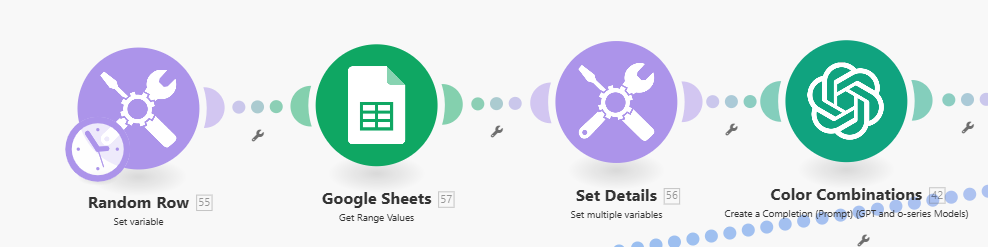
2. Build the prompt and generate. The designer's instructions get combined with the style and colors into a single image prompt. The scenario calls the Midjourney API through ImagineAPI, then waits three minutes for the generation to finish.
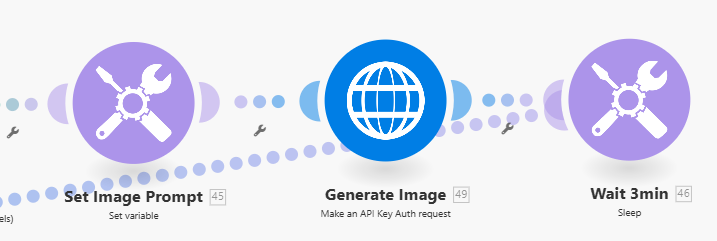
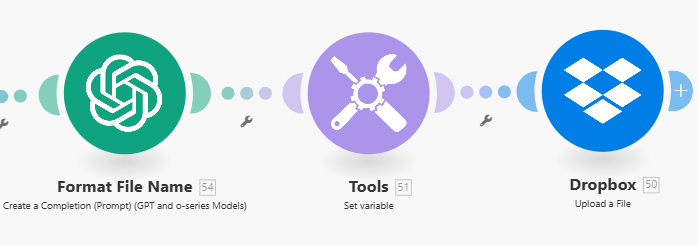
3. Upscale and name each image. Midjourney returns four images per generation, so the scenario pulls them by ID, iterates through all four, upscales each one through DeepAI, and has GPT generate a descriptive file name.
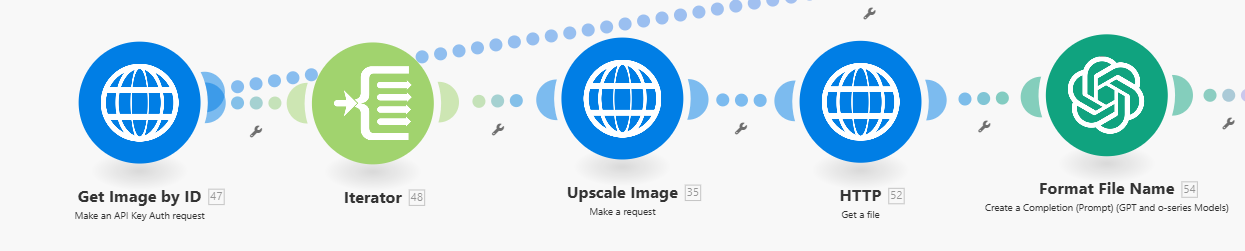
4. File it. The file name gets normalized and the image uploads to a Dropbox folder, where the design team reviews it.
Could the whole thing go further, with a model reviewing and selecting the designs too? In theory. The team wanted a designer's judgment on every final product, and that matched how I prefer to build these anyway.
Where the Time Actually Went
The wrong model, at first. The first version used DALL·E 3, mostly because it had a direct API and a simple weekly call. Pattern-based images weren't its strength at the time, so we switched to Midjourney, which meant rebuilding the generation step around a third-party API.
Four images, not one. Midjourney generates four images per prompt. That's a feature when you're browsing and a complication when you're automating, because every downstream step had to iterate through all four and upload each one separately.
Prompts and colors. This was the biggest sink. Getting the style and color parameters to produce what the designers actually wanted took many hours of tuning. "Complementary colors" is easy to say and surprisingly hard to get a model to deliver consistently.
The extra subscription. Calling Midjourney required ImagineAPI, a paid monthly service on top of Midjourney itself. It worked, but it's an extra dependency and an extra bill, which isn't ideal for something meant to run for years.
The Results
- Before: about five hours a week spent generating concepts, with less variety than the team wanted.
- After: 50 to 100 images a week ready for review, and roughly half a day per week back for the design team.
- Since this build, we've added around 20 more automations for the same store, mostly image generation for specific product lines.
"This automation completely changed how we approach early-stage design. What used to take half a day now runs in the background while we focus on refining the ideas we actually want to pursue. Thank you, Tom, this saved our team hours every single week." - Store Owner
Two improvements came later. A vision model now looks at all four images from each generation and picks the one closest to each designer's aesthetic, which they defined over several rounds. And a theme-based version lets a designer type something like "Colorado" and get bold mountain and snow patterns, or "Summer" and get light, bright ones.
What I'd Do Differently Today
Start with the vision pick. Having a model select the best of four was added later and should have been there from the start. It cuts the review pile by three quarters before a designer sees it, and the designers' own definitions of "their" aesthetic turned out to be the most useful prompt text in the whole system.
Check the model landscape first. Image models have changed a lot since this build, and the gap between them on a specific task like patterns is wide. Today I'd run the same ten prompts through three or four current models before committing to any of them, rather than discovering the mismatch after the first version was built.
Keep the designer in the loop. Same conclusion as every case study in this series. The automation's job is to make the pile of options bigger and better. Deciding what's good is the designers' job, and it should stay that way.
Wrapping Up
If you have a creative team that's starved for starting points, this is a pattern worth copying: randomized inputs from a list the team controls, a generation step, an upscale and a sensible file name, and a folder the team already looks at. The specific image model will keep changing, probably every few months, and the structure around it can stay the same.
The same store's product build automation picks up where this one ends: once a design is chosen, that workflow turns it into a full product line. Together they cover the path from concept to published product with a human decision at each end.
If you want help thinking through what to automate first, book a free 30-minute call and we'll map it out together.
Frequently asked questions
Can you automate image generation for product designs?
Yes, as a concept generator rather than a finished-design machine. In this build, Make picks a design style and a color palette from a list, writes a prompt that combines them with the designer's instructions, generates the images through Midjourney, upscales them, and drops the files in Dropbox. Designers then review, adjust, and decide what becomes a product.
Midjourney or DALL·E for pattern designs?
Midjourney, in this case. We started with DALL·E 3 because it had a direct API, but pattern-based designs weren't its strength at the time. Midjourney produced better patterns and offered far more parameters to tune, at the cost of needing a third-party API to call it and handling four images per generation instead of one.
How do you keep AI-generated designs from all looking the same?
Randomize the inputs. The automation picks a style at random from a list the designers maintain (abstract, plaid, wavy, grid, and so on), then generates a palette of two to five complementary colors, and feeds both into the prompt. A later version lets a designer type a theme like "Colorado" or "Summer" and get patterns built around it.
How many designs does it produce?
Roughly 50 to 100 images a week, ready for the design team to review. Before the automation, the team spent about five hours a week generating concepts by hand and still struggled to get enough variety.
Does a designer still review every image?
Yes, by choice. You could automate the review and selection with a vision model, and a later version uses one to pick the best of each set of four. But the team wanted a designer's hand on every final product, and I'd make the same call.