
Automating Product Builds for a Shopify Print-on-Demand Store: A Case Study
Print-on-demand stores have a scaling problem that isn't obvious from the outside. Every new design has to be turned into a product, and if you sell that design on a t-shirt, a hoodie, leggings, a crop top, and a dozen other items, that's a dozen product builds per design. Upload the file, place it on the garment, check the placement, name it, describe it, repeat. The client I worked with was spending 10 or more hours a week on this, and it was the thing standing between them and more designs.
This is the case study of the automation that fixed it. The brand asked to stay anonymous, since print-on-demand still carries a perception problem for some customers, but they reviewed and approved everything here.
The Problem
The store ran on Shopify with Printify handling the printing. For each new design, someone manually uploaded the image to Printify, attached it to each product "blueprint" (the template for a specific garment), and then reviewed the placement to make sure the final product had no gaps or errors in the layout. Product names and descriptions were written separately, with ChatGPT helping but still by hand.
The goal at the start was modest, just saving time attaching designs to blueprints, and it grew from there.
How It Works
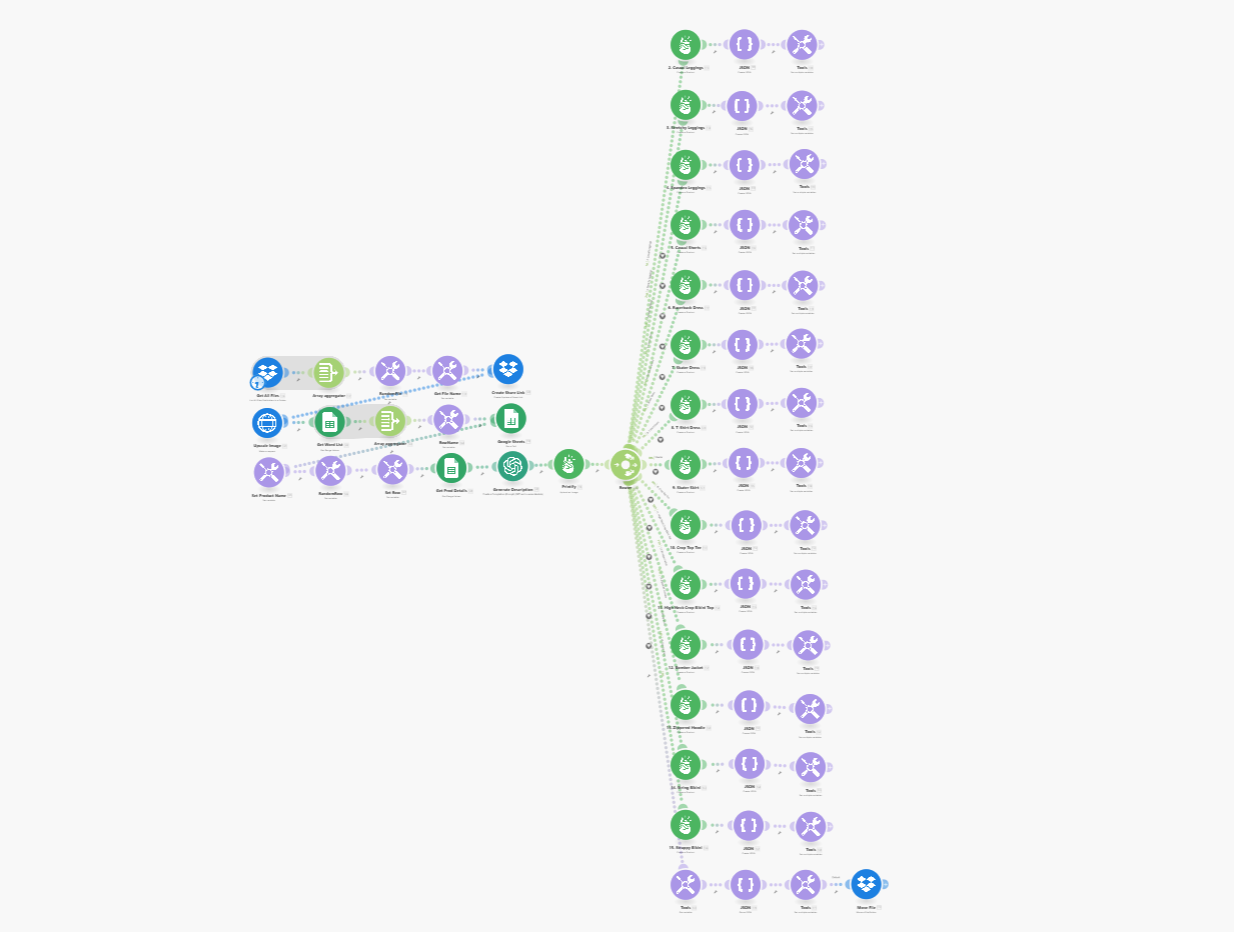
The automation runs in Make, driven by the Printify API:
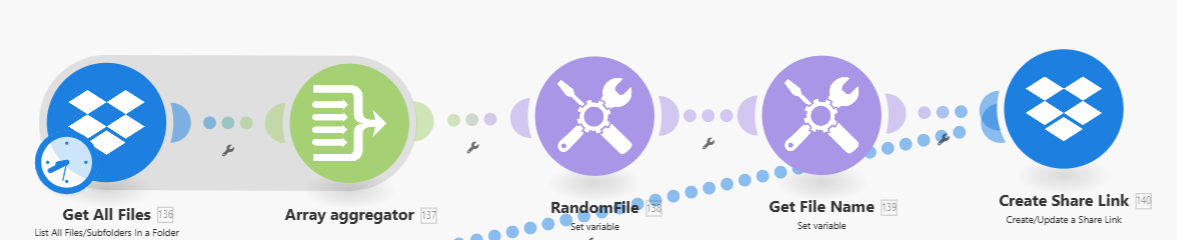
1. Pick a design. The scenario pulls the list of design files from a Dropbox folder, selects one, and creates a shareable link for the steps that follow.
2. Upscale and name it. Some of the original designs were low resolution, so the image goes through DeepAI's upscaler via an HTTP request. Then a product name gets pulled at random from a list of pre-vetted names in Google Sheets.

3. Write the description. The scenario sets the product name, pulls that product's details from Google Sheets, and has GPT write a description based on them.

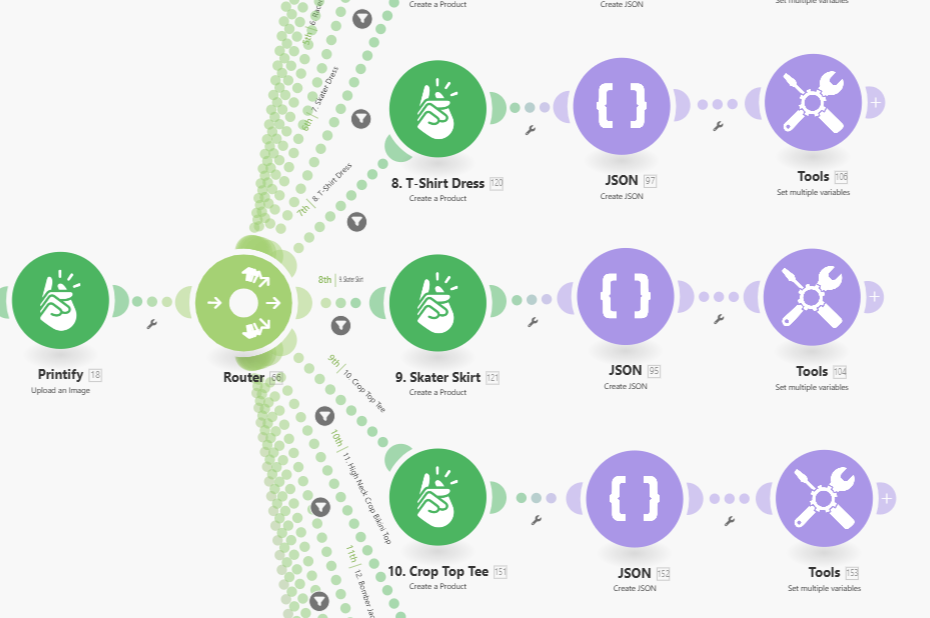
4. Upload and fan out. The design uploads to Printify once. Then a router fans out to one branch per product, and each branch creates that product from its blueprint with the design placed on it. That column of branches on the right side of the diagram is the whole product line, built from one file.
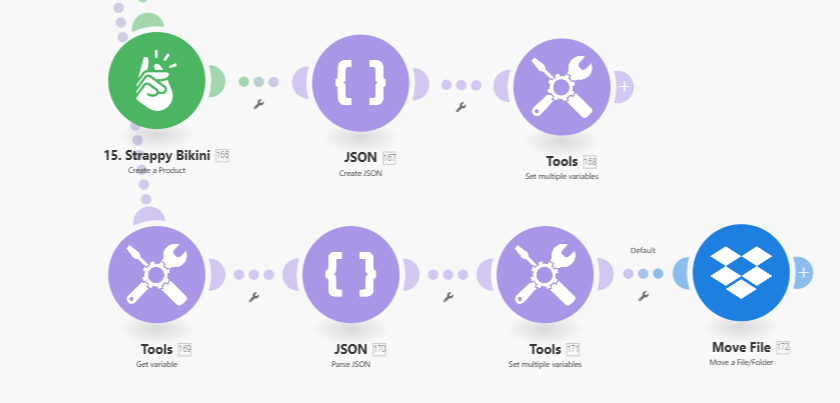
5. Clean up. Once every product exists in Printify (created, not published), the branches merge back into one path that moves the design file from "pending upload" to "completed" in Dropbox.
We could have gone one step further and published straight to Shopify. We didn't, and the client didn't want us to. A person looks at every build before it goes live.
Where the Time Actually Went
Design placement. Printify's documentation gave very little guidance on exactly where a design lands on each garment. Every product type needed iterations and manual test prints to get the file aligned to the blueprint without gaps. This is the part no API doc will save you from.
Upscaling. Not every design needed it, but enough did that a third-party upscaling step had to be built in, with the HTTP request and the file handling around it.
Collapsing the branches. Fanning out to fifteen products is easy. Bringing fifteen paths back into one, with the metadata from each intact, needed a custom JSON bundle to carry everything through.
The Results
Before: 10-plus hours a week uploading designs, attaching them to products, writing descriptions, and publishing.
After: new product builds every day, each needing a quick review and a one-click publish. The client's attention moved from publishing products to designing them, and they can scale output up or down with the season. Over six months, they and I put the savings in the hundreds of hours. Their new bottleneck, by their own account, was the design process itself, which we later helped with too.
"Before this automation, building products was the biggest time sink in our workflow. It took hours just to prep one design across all our products - it was frustrating and completely unsustainable. Now, we drop a new design into Dropbox and the system does the rest. All we have to do is review and publish. It's saved us hundreds of hours over the past six months and completely changed how we think about scaling." - Store Owner
Since this first build, we've built over 50 automations for the same store: customer management tracking, product review analysis, inventory tracking, and design generation among them.
What I'd Do Differently Today
Let a vision model look at the design. The later version of this already does it: instead of pulling a name from a pool and writing a generic description, a vision model looks at the actual design and writes a unique name and description for it. I'd build that in from the start now.
Per-product-line descriptions. A description for leggings and a description for a bomber jacket shouldn't be the same text with the product name swapped. Pulling in the target audience and the right keywords per line was on the roadmap and is cheap to do now.
Have Claude build the fan-out. Fifteen near-identical branches is exactly the kind of repetitive scenario-building I now hand to Claude Cowork. The design placement testing still has to be done by a person with a real garment in front of them, but the wiring is the kind of thing Claude can do in an hour.
Wrapping Up
The general lesson: when one input has to become many outputs, that fan-out is the automation. Upload once, generate everything, review once. It applies to product builds, to document generation, to social posts. The part to protect is the review step at the end, because a misplaced print on a live product costs more than every minute of review combined.
If you run a store with a "per product, per design" chore in it, that's the place to start. What to know before you automate covers how to map it out before building.
If you want help thinking through what to automate first, book a free 30-minute call and we'll map it out together.
Frequently asked questions
Can you automate creating print-on-demand products?
Yes. In this build, dropping a design file into a Dropbox folder triggers a Make scenario that upscales the image, names the product, writes a description, uploads the design to Printify, and places it on every product blueprint the store sells. The products are created but not published, so the owner reviews and publishes with one click.
Does Printify have an API for creating products?
It does, and it's what this automation uses to upload designs and create products. The thin part is the documentation around design placement on each garment. Getting a design to sit correctly on a hoodie versus a tote bag took manual testing per product type.
How do you write product descriptions automatically?
The scenario pulls each product's details from a Google Sheet and asks GPT to write a description from them. The later version goes further: a vision model looks at the design itself and writes a unique name and description for it, instead of pulling from a pool of pre-vetted names.
Should products publish automatically?
Not in this case, and the client agreed. The automation stops one step short of publishing so a person can check that the design sits correctly on every product before it goes live on the store. A misplaced print on a published product is worse than a 30-second review.
How long does an automation like this take to build?
More than 40 hours across several iterations. The first version handled one product. The final version fans out to the whole product line from a single design, which is where most of the time went, along with the design placement testing.