
How Much Time Does AI Actually Save?
Every AI and automation vendor has a number. Eighty percent faster. Ten hours back every week. Ten times the throughput. Some of those numbers are real. A lot of them trace back to one happy customer, a vendor's own spreadsheet model, or nothing at all.
I wanted numbers I could put on my own website without crossing my fingers, so I had AI do the research (fitting, I know). A set of AI research agents combed through published studies and benchmarks on 23 common back-office processes, from invoice processing to PTO requests, rated every source, and threw out the ones that didn't hold up. Every number below links back to its source.
The numbers are out there, and they're pretty good. But they leave out most of the story, for two reasons: almost nobody can measure the time they save, and the biggest wins I see with clients don't show up as time saved at all.
TL;DR
- 2 to 5 hours a week saved per person who uses AI tools regularly.
- About 70% less hands-on time on a typical automated back-office workflow.
- 2x+ faster turnaround once a process is automated.
- Those numbers are solid for well-defined, repetitive tasks. The per-person numbers are mostly people's own estimates.
- The bigger story is the work that wasn't worth doing before and is now doable in days or weeks.
How I Put This Together
I split back-office work into four groups (finance, sales and customer ops, HR, and general admin) for a total of 23 processes. For each one, the agents looked for published numbers on how much time automation or AI saves. That turned up 122 data points from about 110 sources: industry benchmarking groups like APQC, Ardent Partners, and The Hackett Group, government trials in the UK and Australia, academic studies, analyst reports, and plenty of vendor case studies.
A few ground rules:
- Every source got a quality rating. High for independent benchmarks, academic studies, and government trials that could be checked at the original source. Medium for analyst research, including vendor-funded studies from firms like Forrester. Low for single-customer case studies and vendor blogs.
- Some numbers got thrown out. Eight data points didn't trace back to a real source or didn't add up.
- Only staff time counts toward the headline. Turnaround time and cost per transaction are tracked separately, because waiting time and dollars aren't the same thing as effort.
- Medians, not averages. One wild case study claiming 97% shouldn't drag the whole number up.
The Numbers
2 to 5 hours a week per person. The best US data comes from the St. Louis Fed's national survey. People who used generative AI at work saved about 2.2 hours in a 40-hour week. About two-thirds of weekly users saved two hours or more, and among people who used it every day, a third saved four hours or more. The UK government ran a trial with 20,000 civil servants using Microsoft Copilot and landed in the same place: 26 minutes a day, close to two weeks a year. The low end comes from a Danish study of 25,000 workers, at roughly an hour a week, but the same study found the benefits were 10 to 40% bigger when employers actively encouraged and supported AI use.
The way I read it, training's real job is getting people from occasional use to regular use, because that's where the hours are. In my own training sessions it varies wildly. One person told me it saved her five hours of admin work a week. Another said it created more work, because she now spends time validating outputs. Across my clients, I suspect 1 to 2 hours a week is the honest average.
About 70% less hands-on time. Across the 19 processes with usable staff-time data, the typical process cut hands-on time by 71%. Across all 44 individual data points, the median was 74%. I round that down to 70%. Here's how each process shook out. Strong means at least three data points, including an independent study. Moderate means at least two, not all from vendors. Thin means one data point or vendor sources only, so treat those as directional.
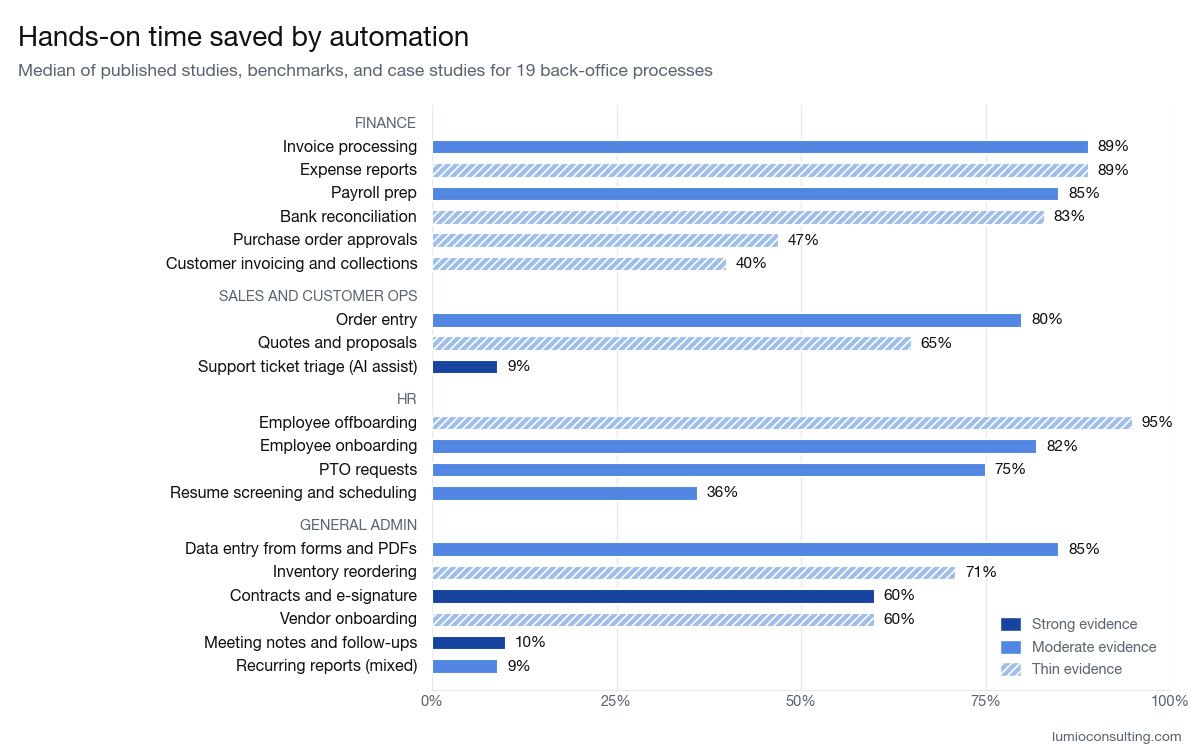
Finance
| Process | Hands-on time saved (median) | Evidence |
|---|---|---|
| Invoice processing (accounts payable) | 89% | Moderate |
| Customer invoicing and collections | 40% | Thin |
| Expense reports | 89% | Thin |
| Bank reconciliation | 83% | Thin |
| Month-end close | Not enough data | Thin |
| Payroll prep | 85% | Moderate |
| Purchase order approvals | 47% | Thin |
Sales and customer ops
| Process | Hands-on time saved (median) | Evidence |
|---|---|---|
| Order entry | 80% | Moderate |
| Quotes and proposals | 65% | Thin |
| Lead intake and CRM updates | Not enough data | Thin |
| Client onboarding and intake | Not enough data | Thin |
| Appointment scheduling | Not enough data | Thin |
| Support ticket triage (AI assist) | 9% | Strong |
HR
| Process | Hands-on time saved (median) | Evidence |
|---|---|---|
| Employee onboarding | 82% | Moderate |
| Employee offboarding | 95% | Thin |
| Resume screening and interview scheduling | 36% | Moderate |
| PTO requests | 75% | Moderate |
General admin
| Process | Hands-on time saved (median) | Evidence |
|---|---|---|
| Data entry from forms and PDFs | 85% | Moderate |
| Recurring reports | Mixed (-22% to 40%) | Moderate |
| Meeting notes and follow-ups | 10% | Strong |
| Contracts and e-signature | 60% | Strong |
| Vendor onboarding | 60% | Thin |
| Inventory reordering | 71% | Thin |
2x+ faster turnaround. Turnaround is how long something takes from start to finish, including all the waiting around for approvals. Fifteen processes had turnaround data, and the median cut was 59%, about 2.4 times faster. Some do better: invoices at the most automated finance teams clear in about 3 days versus 9 (Ardent Partners), and orders at the most automated companies get delivered in 2 days versus 8 (APQC). One caveat: most of this compares top performers with typical ones, not the same company before and after.
Where the Numbers Get Shaky
Vendor case studies run hot. Single-customer case studies and vendor blogs put the median time saved at 80%. Independent benchmarks, academic studies, and analyst research put it at 47%, for the same processes.
AI helping with judgment work saves less. The randomized studies tell a humbler story than the surveys. AI help cut customer support handling time by about 5 to 10% (Uber, Stanford and MIT). AI note-takers for doctors cut note time by up to about 10% (UCLA). In a small UK government test, Copilot actually made spreadsheet analysis slower. The big wins show up on repetitive data work: in one lab study, pulling data from scanned documents dropped from 160 seconds each to about 17.
Some popular stats don't hold up. The "12.5 minutes to process an invoice by hand" figure that's widely credited to an industry group actually comes from one AP software vendor's own model. "APQC found order automation is 80% faster" is really a vendor's customer claim, quoted inside an APQC report. And onboarding figures credited to SHRM, Brandon Hall, and Gartner didn't show up in those sources.
Problem One: Nobody Actually Tracks Their Time
The thing that's always bugged me is this: almost nobody, and I mean nobody, keeps track of how much time they spend on email, on each individual task, or on any given thing they create.
People are dynamic. They reply to one email, switch over to the presentation they've been building, jump into Slack to answer a question, then go back to email. Tracking time spent on any one project, or on any one kind of work, is close to impossible by nature.
That's why the per-task numbers above are solid and the per-person numbers are fuzzy. You can measure time saved on a well-known, well-defined, fully manual task. Keying in an invoice takes about the same amount of time every time, so you can time it before and after. A person's week doesn't work that way.
So the per-person research mostly asks people to estimate. The Fed survey asked workers how many extra hours they would have needed without AI. The UK trial had people pick a range of minutes saved per day. Australia's government trial called its own number a likely upper bound. And when someone does check, the estimates tend to shrink. In 2023, the GSA's inspector general audited the agency's automation program, which claimed its bots saved 240,000 work hours a year. The auditors couldn't back that up: the hours had never been checked with the people using the bots, and 9 of the 10 bots they sampled fell short of their estimates.
Unless you're a robot, putting a number on "time saved per person" is guesswork at best. (That won't stop me from putting one on my homepage. It's a conversation starter.)
Problem Two: Time Saved Is a Small Slice of the Pie
Every study in this post measures the same thing: how much faster an existing task gets. None of them measure the work that wasn't happening at all, because it wasn't worth the time or the money. With today's tools, a lot of things that weren't realistic a year ago are easy now. A few from my own client work:
Three years of public meetings, analyzed. One client wanted to understand which issues kept coming up, over and over, in a city's town halls and council meetings. We built a small automation in Claude Code that analyzed three years' worth of meeting transcripts from YouTube, about 385 hours of video, pulled out the recurring topics, and flagged trends that affect the city. Could a person have done that? Probably. But it would have taken potentially hundreds of hours, and at that point, is it worth it?
A Minecraft-style game about walking to school. The same client wanted a game where kids recreate their walk to school and add safety features (stop signs, bike lanes, crosswalks, speed signs, bump outs, roundabouts) to show what helps them feel safe on the way. We built a full virtual world over a couple of weeks, refining it based on feedback from the client, parents, and the kids themselves. Could a person have built it? Sure. Would it have taken months instead of weeks? Absolutely.
A grant-building tool. I'm helping another nonprofit build an internal tool for grant requests. Someone uploads the documents and details for a request, and the tool pulls everything together into a single, formatted, ready-to-review grant. Work that used to mean hours of copying between files now takes a few minutes of review. The first working version will take about two weeks of dedicated work. Until recently, a custom tool like this wasn't an option for a nonprofit at all, financially or time-wise.
The same goes for the one-off websites and internal apps you can now build in days instead of months. None of this shows up in a time-saved study, because the starting point was "we never would have done it." Every cost-saving and efficiency study measures the small slice of the pie. The big slice is the stuff that gets built now that never would have been.
"We never would have done it."
What This Means for Your Team
- Automate the repetitive, well-defined work first. Data entry, invoices, orders, onboarding paperwork, and approvals are where the 70 to 90% savings show up, and they're the only places you can measure them cleanly. Time the task a few times before and after. Your number beats any benchmark, including mine.
- Don't try to track every minute. Per-person time savings will always be an estimate. Ask your team whether the tools are helping and which parts of their job are repetitive and take the most time. Save the stopwatch for the well-defined tasks.
- Think outside the box. Make a wish list of technical projects that you've shelved because they'd take too long or cost too much. You might be surprised at how many are possible now.
Final Thoughts
The numbers are real: a few hours a week for people who use AI regularly, about 70% less hands-on time on automated back-office work, and roughly twice the speed from start to finish. They're also the smallest part of the story. Time saved is hard to measure anywhere outside well-defined tasks, and the biggest wins I see come from work that wasn't on the table before.
If you want help figuring out what to automate first, or which shelved project might be doable now, book a free 30-minute call and we'll map it out together.
Sources
The full dataset, with every source and its quality rating, is available as a spreadsheet. The main sources cited above:
- Federal Reserve Bank of St. Louis: The Impact of Generative AI on Work Productivity (2025)
- UK Government Digital Service: Microsoft 365 Copilot Experiment, Cross-Government Findings (2025)
- UK Department for Business and Trade: Microsoft 365 Copilot Pilot Evaluation (2025)
- Australian Digital Transformation Agency: Copilot Trial Evaluation (2024)
- Humlum and Vestergaard: Large Language Models, Small Labor Market Effects (2025)
- GSA Office of Inspector General: GSA's Robotic Process Automation Program Lacks Evidence to Support Claimed Savings (2023)
- Ardent Partners: Accounts Payable Metrics That Matter in 2025
- APQC: Transform Customer Service and Operations Through Order Automation (2018)
- Brynjolfsson, Li and Raymond: Generative AI at Work (2023)
- Molino, Zheng and Wang: COTA, Improving Customer Support with Deep Networks (2018)
- Ambient AI Scribes in Clinical Practice: A Randomized Trial, NEJM AI (2025)
- ERPA: RPA Model Integrating OCR and LLMs for Intelligent Document Processing (2024)
- Aequo AP: Invoice Processing Time Benchmarks (2026)
Frequently asked questions
How much time does AI save per person?
About 2 to 5 hours a week for people who use AI tools regularly. The St. Louis Fed's national survey found generative AI users saved about 2.2 hours in a 40-hour week, and a third of daily users saved four hours or more. A UK government trial with 20,000 civil servants landed at 26 minutes a day. These are self-reported estimates, so treat them as a range, not a measurement.
How much time does automation save on back-office tasks?
About 70% less hands-on time on a typical automated process. Across 19 back-office processes with published staff-time data, from invoice processing to PTO requests, the median cut was 71%. The well-defined, repetitive tasks (data entry, invoices, payroll prep, onboarding paperwork) land at 80 to 90%. Judgment-heavy work like support tickets and meeting notes lands closer to 10%.
Are vendor claims about AI time savings reliable?
Not on their own. In this dataset, single-customer case studies and vendor blogs put the median time saved at 80%, while independent benchmarks, academic studies, and analyst research put it at 47% for the same processes. Several widely quoted figures, like "12.5 minutes to process an invoice by hand," trace back to one vendor's own model rather than a study.
Why is time saved so hard to measure?
Because almost nobody tracks their time. You can time a well-defined task like keying in an invoice before and after automation. You can't do that for a person's week, which is a constant switch between email, documents, Slack, and meetings. So per-person numbers rely on people estimating, and when auditors check, the estimates tend to shrink.
What should a small business automate first?
The repetitive, well-defined work: data entry, invoices, orders, onboarding paperwork, and approvals. That's where the 70 to 90% savings show up, and it's the only place you can measure them cleanly. Time the task a few times before and after. Then ask what you'd build if it took days instead of months, because that's where the bigger wins are.