
Getting Started with AI Agents
When I first wrote about agents in Anatomy of an AI Agent, I was coming from the world of OpenClaw: a mostly autonomous personal agent that was always on and incredibly useful, but very expensive to run and not built for the average non-technical person.
OpenClaw is one end of the spectrum. The term "agent" covers a huge range of things, and there's no perfect definition or easy way to explain it.
Recently, a client asked me to give a presentation on agents to their team. They're not technical, and they kept hearing the term without really knowing what it meant.
This post is the written-up version of that session: my attempt at explaining agents in plain English. It's deliberately simplified. Production-grade agents get a lot more complex, and I touch on that near the end.
What is an AI agent?
Here's the definition I use:
An AI agent takes multiple steps toward a goal, decides its own next steps, and uses tools to get there, with varying degrees of human input.
The longer version: an AI agent is an autonomous or semi-autonomous system that works from a set of instructions. It takes multiple steps toward a goal, decides its own next steps, and often uses tools to get there (your email, your calendar, your files, the web, or any app it can connect to).
What makes it an agent is that the AI decides its own next steps. Without that, a five-step Zapier workflow would count.
The part I want to stress is the last one: with varying degrees of human input. Agents almost always need people, for improvements, feedback, updates and checking their output. If you want the history of how we got here, I covered it in Agentic AI: Where We Are and Where We're Going.
In its simplest form: instructions + tools
In its simplest form, an agent is two things:
- A set of instructions: what to do, step by step.
- Connected tools: the apps it uses to do whatever the instructions say.
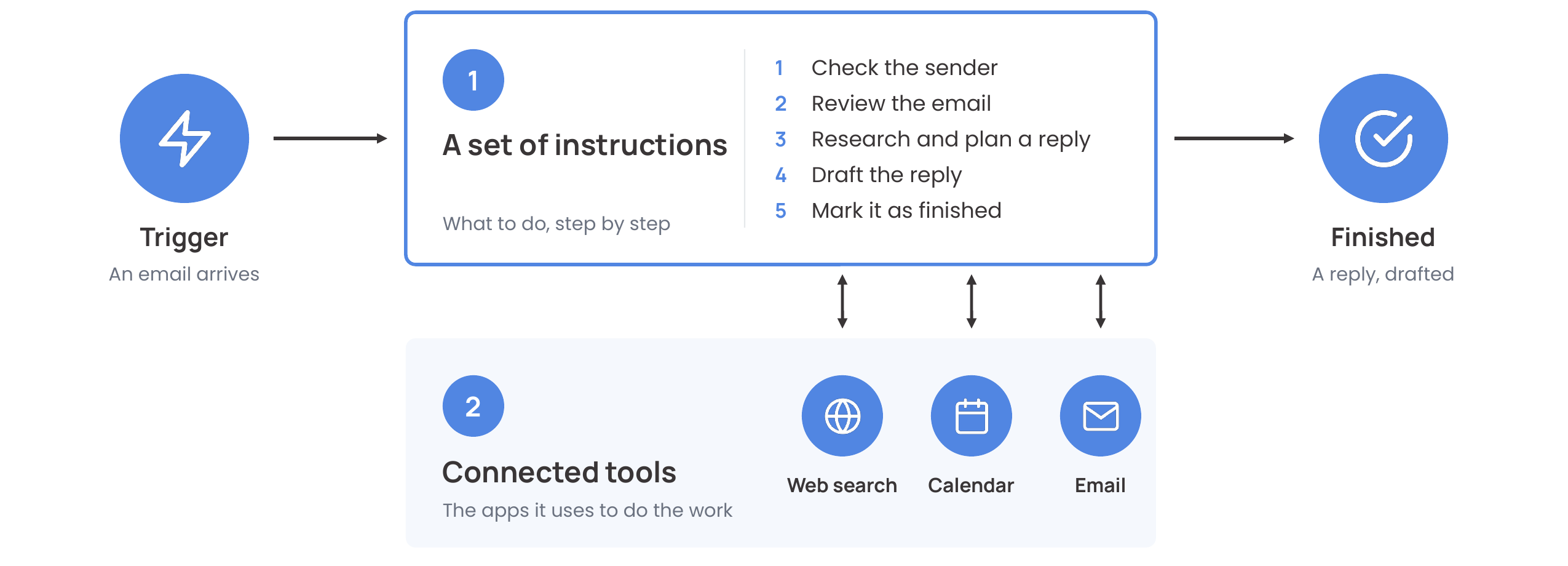
Walk it left to right. An email arrives. The agent follows its instructions: check who sent it, review the email, research and plan a reply, draft it, and mark it as finished. Along the way, it goes back and forth with its tools as needed: a web search for research, the calendar to check availability, and email to read the message and save the draft. Everything else in this post builds on those two pieces.
From simple to complex
The simplest agent might be a single set of instructions. Here's a weekly newsletter agent:
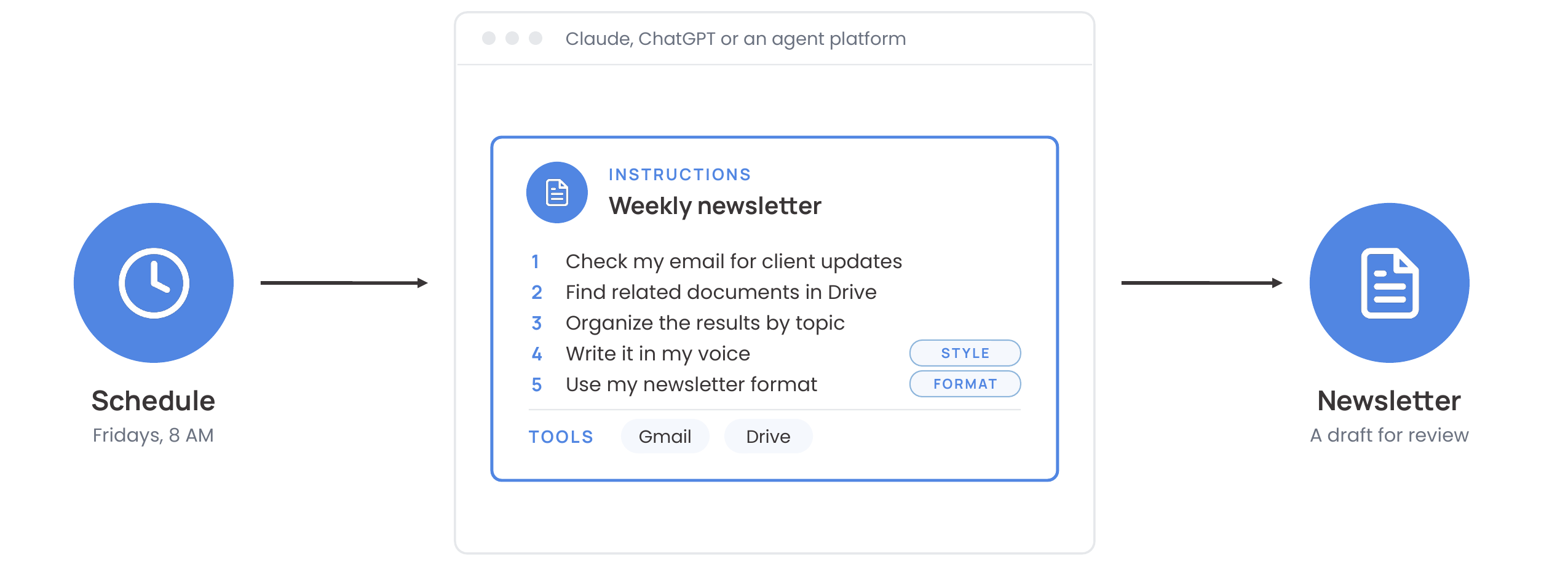
Everything lives in one place: the steps, the tools, your style and your format. It's the simplest way to start, and it's how most custom GPTs work.
A slightly more complicated agent splits the instructions into parts. The task keeps the steps and the tools, and the reusable parts (your writing style and your newsletter format) move into skills the task calls on.
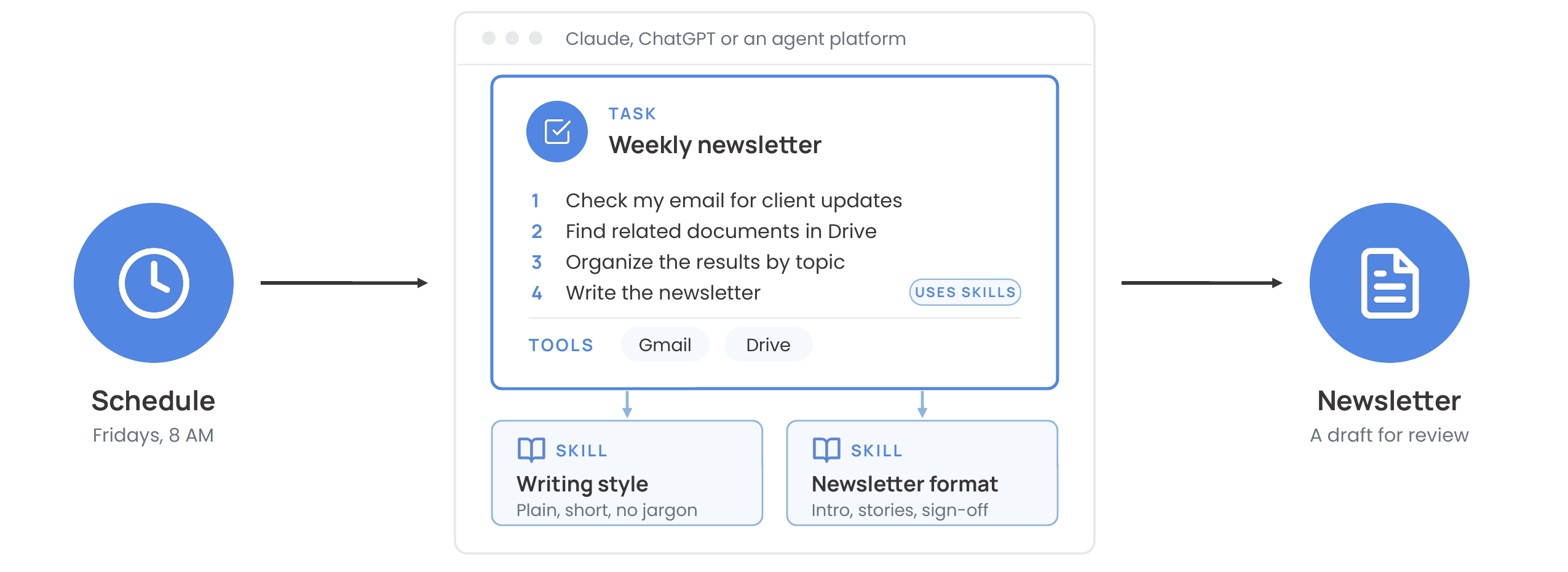
These words get used loosely, so here's how I use them:
- Tools are what the agent acts with: Gmail, Drive, a web search.
- Skills are how to do something well: your writing style, a research method, your newsletter format. They're reusable across jobs.
- Tasks are what to do, and when: the steps for one job, plus what starts it.
Skills and tasks are both made of instructions. You can keep everything in one set, or break it into parts.
A complex agent may have many components: several tasks, each with its own trigger, all drawing on one library of skills and one set of tools. Update your writing style once, and every task picks up the change.
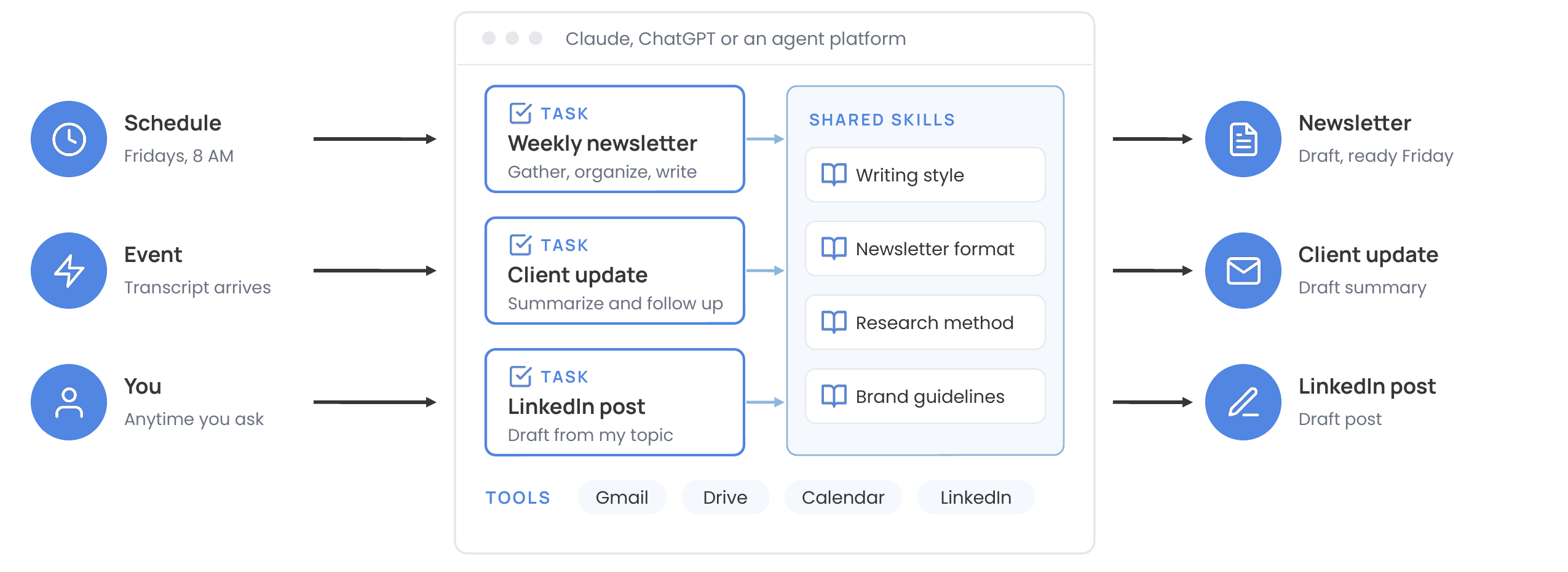
A practical rule for when to split: start with one set of instructions, and pull a piece out into a skill once you notice yourself pasting the same instructions into a second or third task.
Today's most complex agents have even more components. On top of instructions and tools, they have memory, and they have triggers that determine when they run.
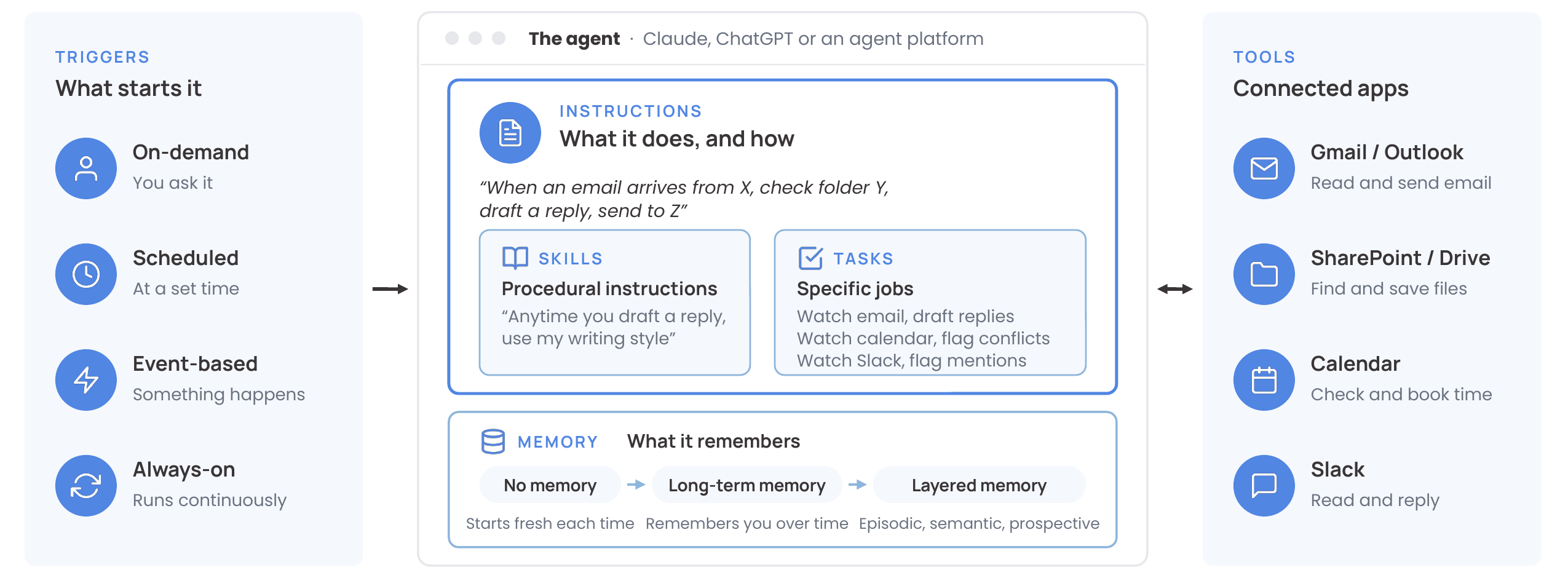
Memory runs from none (every run starts fresh), to long-term memory (it remembers your preferences and past decisions), to layered memory: episodic (what happened last time), semantic (what's true about you and your business) and prospective (things to do later). Layered memory is mostly still emerging; I went deeper on it in Anatomy of an AI Agent. Triggers get their own section below.
Are ChatGPT and Claude agents?
Once I've explained what an agent is, I usually get the question: so is ChatGPT an agent? Or is Claude?
My answer is yes and no.
They're becoming agentic, and a lot of the components are already there, but it's not clear-cut. ChatGPT and Claude both have memory, built-in tools (connected apps), long-running tasks and scheduled tasks, and they're slowly adding event-based triggers.
Here's how I picture the shift, step by step, using the same pieces from above.
1. Where most people are today: back and forth. You explain the task, read the reply, correct it, and go around again until it's right. Then you copy the result to wherever it needs to go.
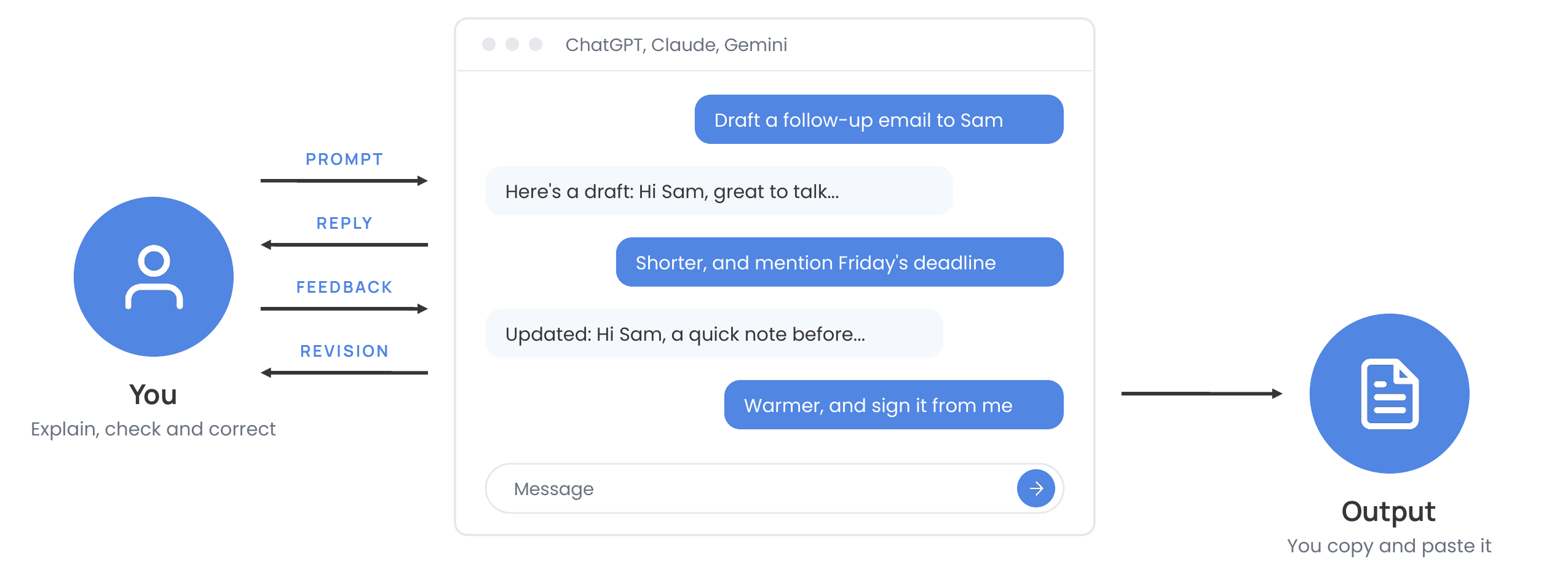
The instructions live in your head, and you retype them every time. On its own, a chat window isn't technically an agent. You're driving every step.
2. Saved instructions plus connected tools. Both ChatGPT and Claude now let you save your instructions and connect your apps. ChatGPT has plugins, which are skills (instructions) plus apps (tools). It's also where custom GPTs are moving: OpenAI is retiring custom GPTs on December 11, 2026 and moving them to plugins.
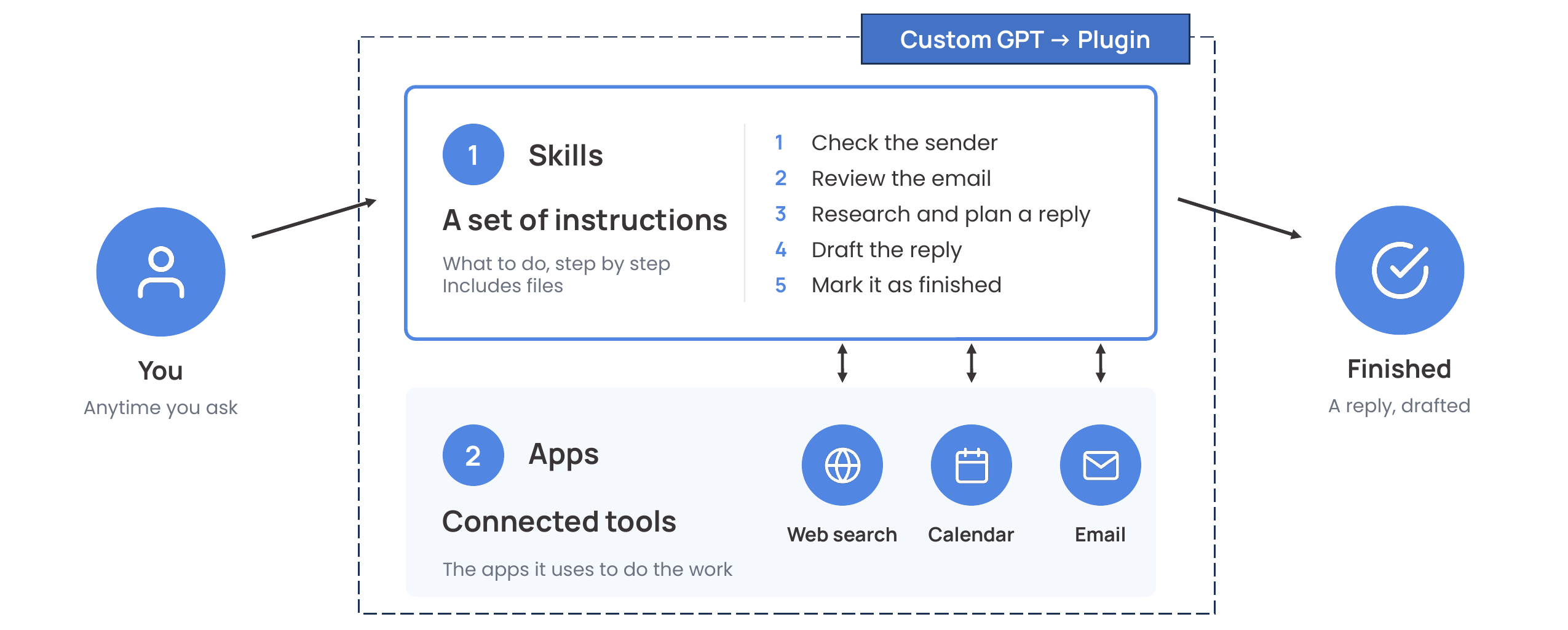
Claude works the same way: skills (instructions) plus connectors (tools), and a plugin can package both into one install.
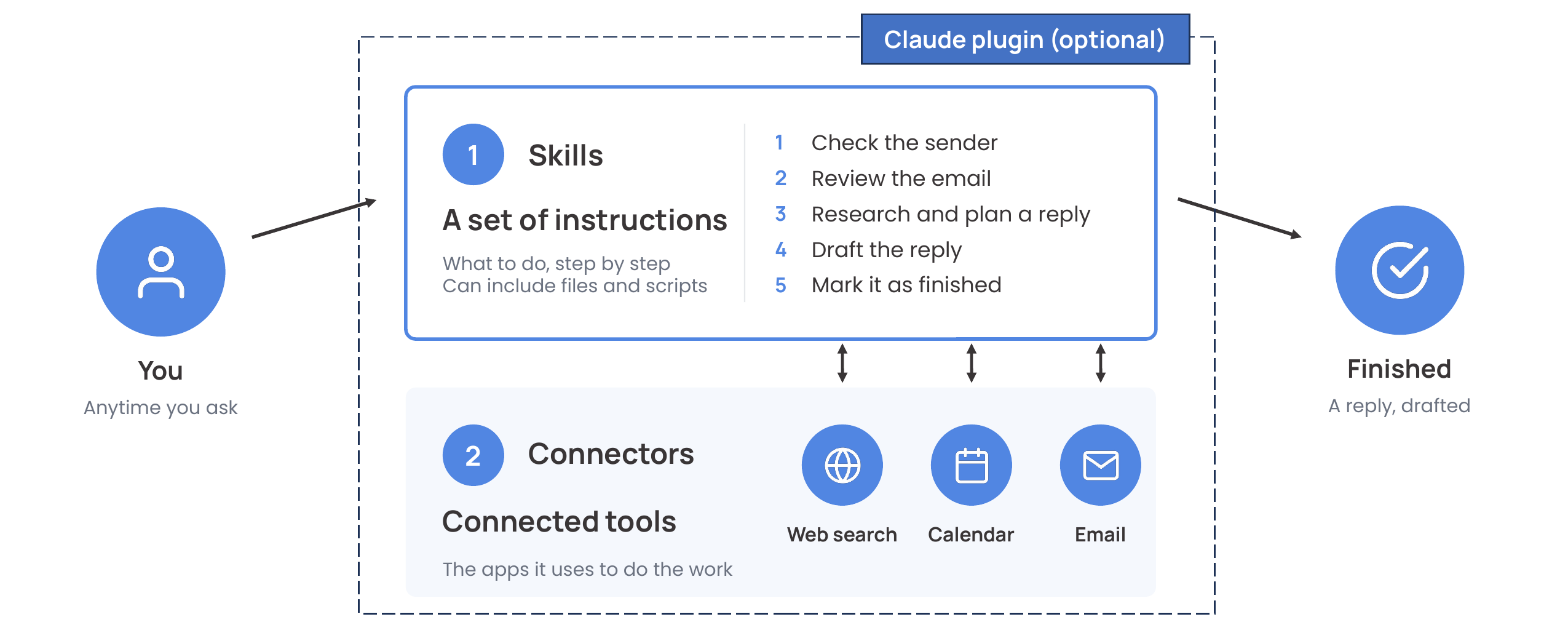
You still start it, but with one request instead of a back-and-forth.
3. Scheduled tasks. Both ChatGPT and Claude have scheduled tasks, which is the first real step toward an agent. Same instructions, same tools. The only change is who provides the input: instead of you typing, a schedule starts it.
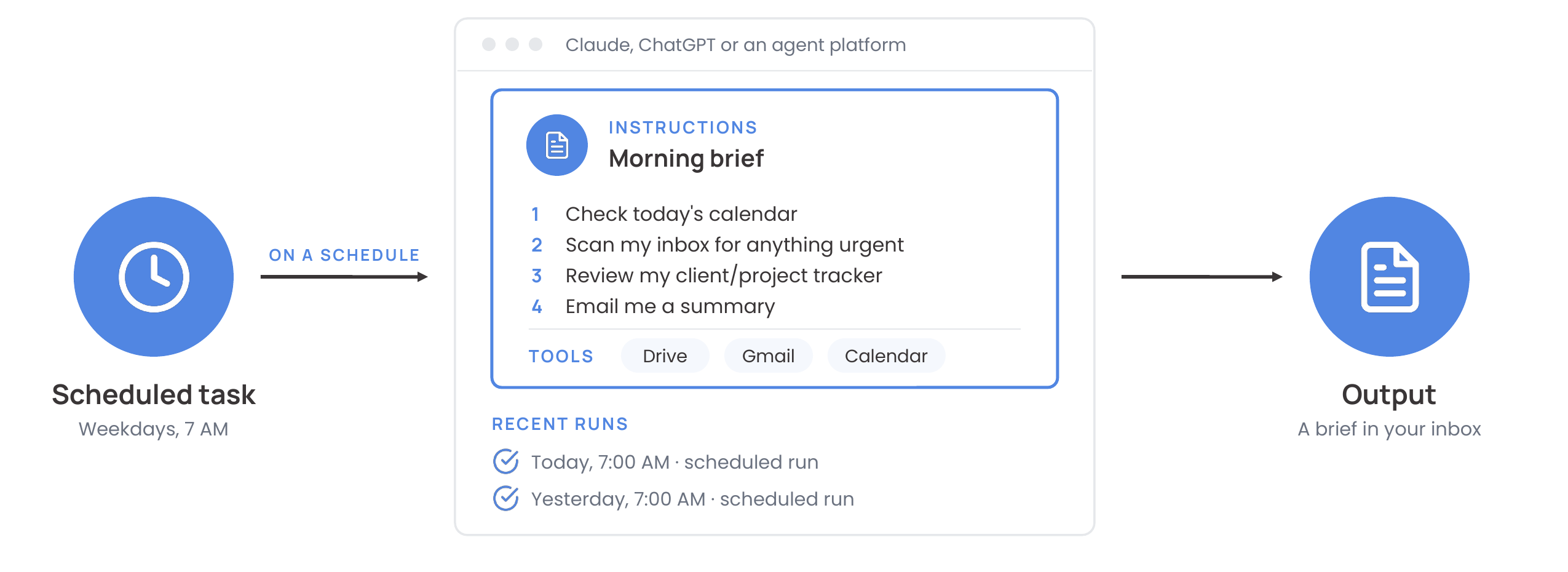
If you're technical, you'd probably call steps 2 and 3 tasks or workflows rather than agents, and you'd be right: I've written the steps, and the AI does the work inside each one. The more you hand it a goal and let it decide the steps (what to research, which tools to call, when it's done), the more agentic it gets. Anthropic draws the same line in Building Effective Agents: workflows follow predefined paths, while agents direct their own process and tool use.
What's next: event triggers and always-on
Steps 1 to 3 are where we are today. I suspect that in the near future, both ChatGPT and Claude will add event-based triggers for everyone, and they're already building always-on agents.
4. Event triggers. The agent starts when something happens: a new email arrives, or a file lands in a folder.
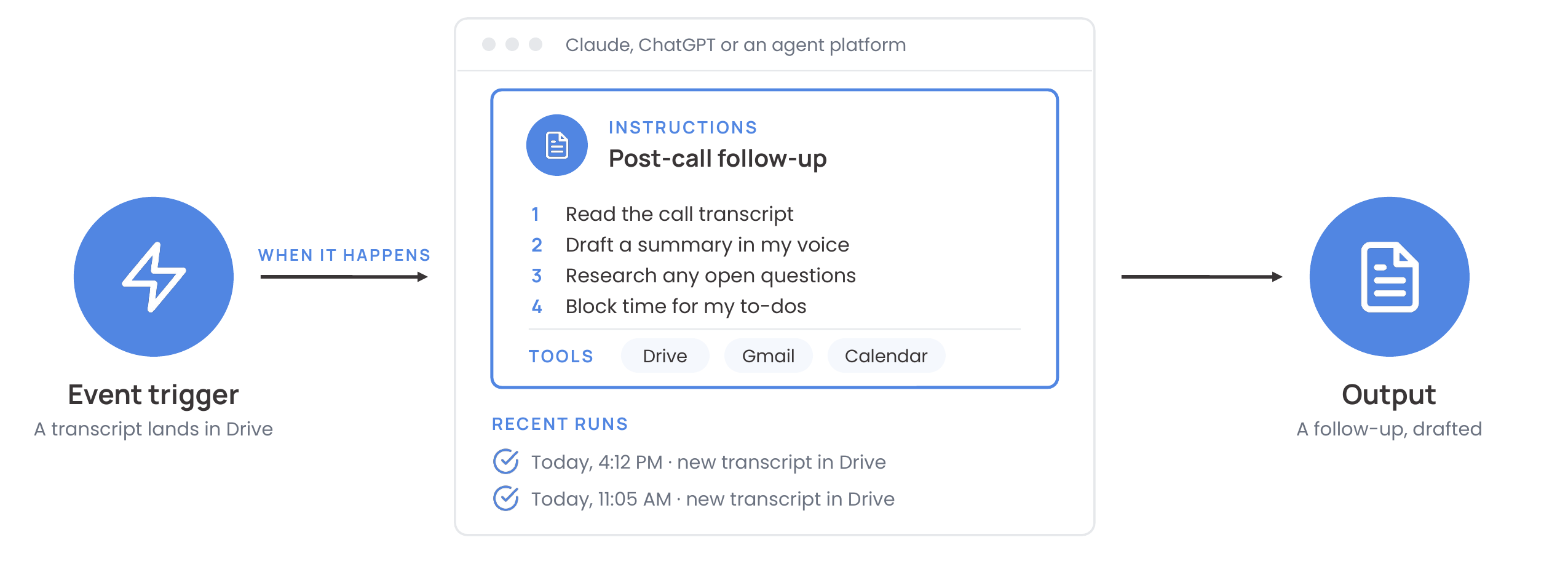
ChatGPT has started on some Enterprise workspaces, where tasks can start from Gmail, Slack or GitHub events if an admin turns it on. Claude Code can start a routine from a GitHub event or an API call. Both are early, and fairly technical.
My own agents use steps 3 and 4: the morning brief runs on a schedule, and the post-call follow-up starts when a call transcript lands in Google Drive. For now, event triggers usually take some extra plumbing (an automation tool like Make or Zapier); I covered that split in Claude Cowork or Claude Code?
5. Always-on. The agent runs continuously and decides for itself when to act. OpenClaw's heartbeat, which wakes it up every 30 minutes to check its to-do list, is the best-known example. The big players have versions now too: OpenAI's dots, Meta's Muse, xAI's Grok Bot, Google's Gemini Spark, and Anthropic's Claude Duet, which runs in the background on its own computer and messages you first. Anthropic also has Claude Tag, a teammate that works alongside your team in Slack. Most of these are paid, limited to certain plans or countries, and early (Duet is still an invite-only preview).
Two levers worth thinking about
There are many levers when you build an agent, but two matter most early on: how the agent knows to run (its trigger), and how much a person is involved (human oversight).
We just covered triggers. For oversight, I find it easiest to think about how often a person touches the work:
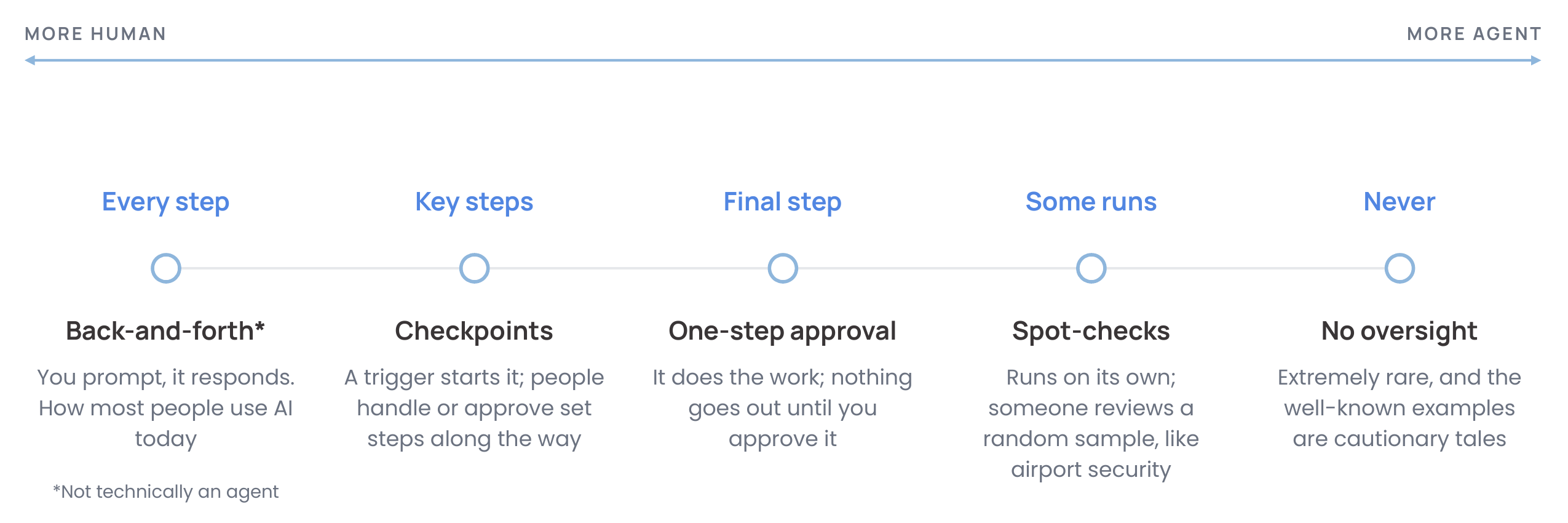
- Every step (back-and-forth). You prompt, it responds. This is how most people use AI today, and it isn't technically an agent.
- Key steps (checkpoints). A trigger starts it, and people handle or approve set steps along the way. For example, a client form comes in, the agent drafts the proposal, you set the price, and the agent sends it.
- Final step (one-step approval). It does the work, and nothing goes out until you approve it.
- Some runs (spot checks). It runs on its own, and someone reviews a random sample, like airport security.
- Never (no oversight). Extremely rare, and the well-known examples are cautionary tales.
Put the two levers together and you get a picture of how autonomous an agent is:
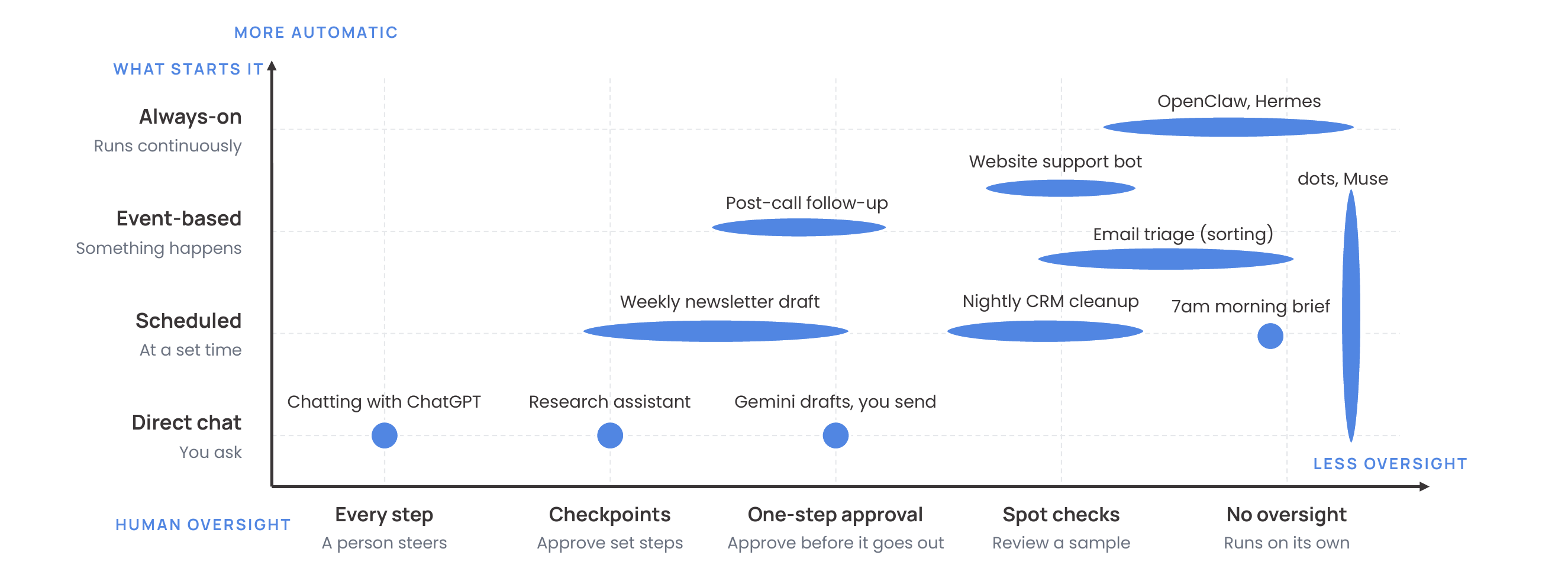
The two levers move independently. An always-on agent can still wait for your approval before anything goes out, and the same kind of agent can sit in different places depending on how it's set up (the longer shapes show that range). My rule of thumb: the more a mistake would cost, the closer a person should be to the work.
That still leaves plenty of low-risk work an agent can do with little or no oversight: sorting your inbox, a briefing that only you read, filing and tagging notes. Nothing goes to a customer, nothing gets spent or deleted, and a mistake is easy to spot and undo.
A few more levers
Triggers and oversight aren't the only things to think about. A few more worth deciding early:
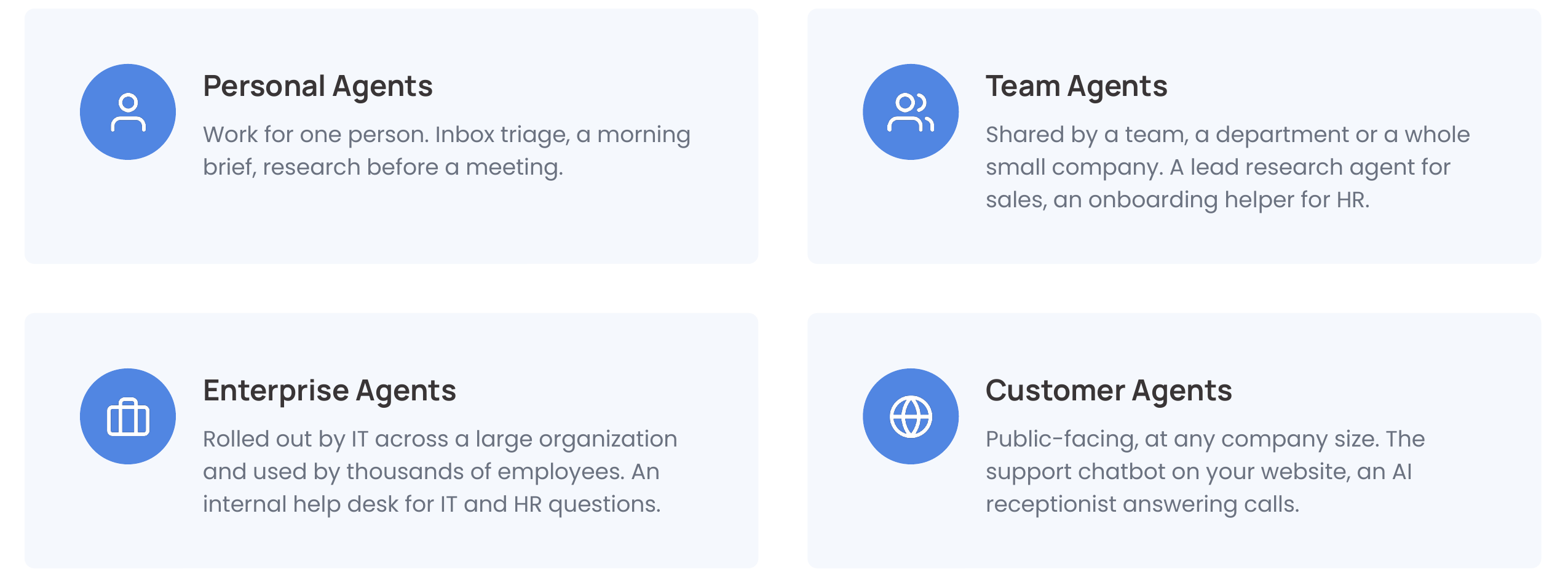
- Who will use it. A personal agent works for one person. A team agent is shared by a team or a small company. An enterprise agent is rolled out by IT to thousands of people. A customer agent is public-facing. The further an agent reaches, the more testing, controls and monitoring it needs.
- Cost. Agents run on usage, and one that runs every hour (or never stops) can quietly add up. When I tested OpenClaw, I let it run in the background for two weeks and watched it burn through ~$200 in credits doing effectively nothing.
- Security and access. What can it read, send or delete? Give it only the access it needs.
- Your data. An agent is only as good as the sources it can read.
- Upkeep. Someone has to own it, fix it when it misses, and update it as your tools and processes change.
Where you build it
Once you have your instructions, tools and triggers defined, you can build an agent wherever you want. Broadly, there are three routes.
Ready-made: switch it on and configure it. That includes agents built into the apps you already use (Gemini in Google Workspace, Copilot, Notion), AI coworkers that take on a role (Lindy, Viktor, Sintra), and personal agents (Meta Muse, OpenAI dots, Claude Duet, Grok Bot, Manus). They're fast to start, but you're limited to what the vendor built.
Platform: build your own agent inside a tool your company already pays for, with little or no code, and the vendor hosts and runs it. For one person, that's the plugins and scheduled tasks covered above. For a team, it's ChatGPT workspace agents (Business and Enterprise), Google Workspace Studio, or Agent Builder and Copilot Studio in Microsoft 365, plus Agentforce or Now Assist if you live in Salesforce or ServiceNow. Claude doesn't have a direct equivalent yet; the closest is sharing plugins across your organization, or Claude Tag in Slack. You get your own process, but only with the apps and triggers the platform supports.
Custom builds: shaped around your process. That includes low-code tools like Make, n8n and Zapier, visual agent builders like Sim, and code frameworks like CrewAI, LangGraph, LlamaIndex and Mastra. They fit your process exactly, but they take setup, testing and upkeep.
For example, I built an always-on voice agent that runs on LangGraph, hosted on Railway, using ChatGPT's voice for easy communication and Claude on the backend for decision-making. It's a neat side project and it works incredibly well, but it's not where the average person should start.
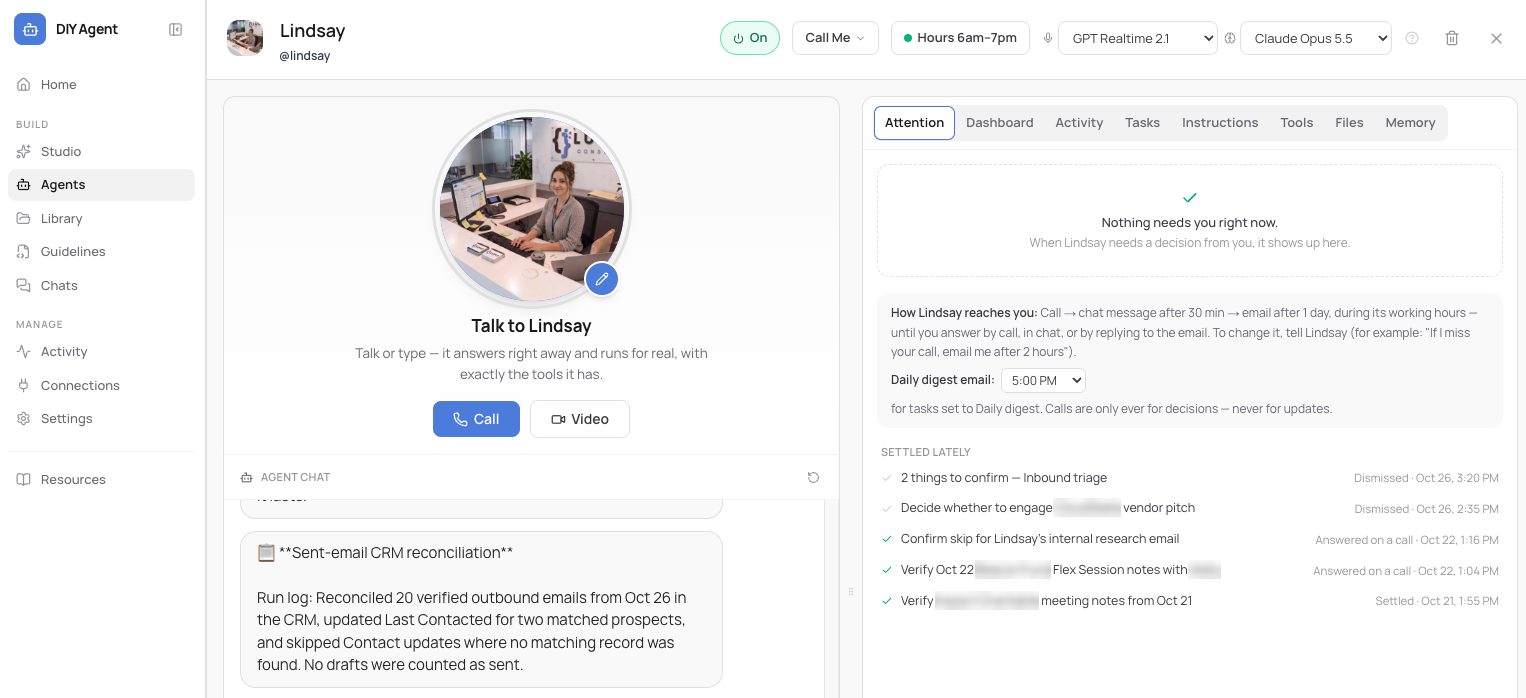
Your best bet is to start with ready-made agents and scheduled tasks, and only build custom when nothing else fits.
Which path fits you
Here's how I lay out the options, simplest first:
| Rung | Examples | Who builds it |
|---|---|---|
| 1. Plugins and custom assistants (where most people are today) | ChatGPT plugins, Claude skills, Gemini Gems | You |
| 2. Scheduled tasks (runs on a schedule, or when an email arrives) | ChatGPT, Claude and Gemini scheduled tasks | You |
| 3. Built-in app agents (multi-step help in tools you already use) | Gemini in Gmail and Docs, Copilot Agent Mode in Word and Excel, Notion Custom Agents | You |
| 4. AI coworkers and team agents (ready-made or built on a platform) | Lindy, Viktor, Carly, Sintra, ChatGPT workspace agents, Google Workspace Studio, Copilot Studio | You, with some setup |
| 5. DIY low-code (several apps, with an AI step in the middle) | Make, n8n, Zapier, Relevance AI | A power user, or me |
| 6. Custom builds (full control, for company-wide or customer agents) | CrewAI, LangGraph, Mastra, the OpenAI and Claude agent SDKs, Claude Code routines | A developer, or me |
If you're a small team, the path to follow is rungs 1 to 4. If you're building agents that will be used by multiple people, you might look at rungs 4 to 6. Every rung up adds capability, cost and upkeep, so climb only when the rung below can't do the job.
How to get started
1. Identify repeatable work
Look for a task you do every week, with the same steps, in digital tools, where a mistake is easy to catch. A weekly summary of a shared inbox, prep notes before recurring meetings, or pulling the same numbers into a report every Monday are all good first candidates.
Now imagine doing this for tasks that are currently manual: you receive a report you need to process, you get an email request, a customer sends a question, a coworker sends a request. An agent is simply a set of instructions (your instructions) with the ability to call and use tools. If you can define the inputs and the instructions, you can offload the task to an agent.
Those instructions can live within ChatGPT or Claude, or on a dedicated agent platform, but they're simply a set of instructions. And those instructions must be defined by you, refined over time, designed with guardrails, checked for accuracy, controlled for cost and security, and updated as data, tools and technology change.
When you write them, brief the agent like you'd brief a new hire:
- The goal: what done looks like, in one sentence.
- What starts it: you, a schedule, or an event.
- The steps: in order, the way you'd explain it to a new hire.
- The apps and files: where to look, and what it's allowed to touch.
- The output: the format, the length, and where it goes.
- When to stop and ask: what it should never do on its own.
An agent runs on the instructions you give it. The better your instructions, the better it performs. Think of an AI agent as a super smart intern who knows nothing about you, your company, or how you like things done. It takes time, training and lots of feedback to get it up to speed.
2. Know what's available to you
You probably already have more of this than you think. Here's where each piece lives in the three tools most people use:
| ChatGPT | Claude | Gemini | |
|---|---|---|---|
| Saved instructions | Skills and plugins | Skills and plugins | Gems (moving to Skills) |
| Connected tools | Apps | Connectors | Gmail, Drive, Calendar and other Google apps |
| Scheduled tasks | Scheduled tasks | Scheduled tasks | Scheduled actions |
| Event triggers | Gmail, Slack and GitHub events, on some Enterprise workspaces | Claude Code routines (GitHub events or an API call) | Workspace Studio, when an email arrives (business plans); Spark (AI Pro and Ultra) |
| Shared or always-on agents | Workspace agents (Business and Enterprise), dots | Claude Duet (preview, Pro and Max), Claude Tag in Slack (Team and Enterprise) | Workspace Studio agents (business plans), Spark |
What you can use depends on your plan, and on business plans your admin decides what's turned on, so it's worth asking. Names in this space change constantly, so treat this as a snapshot from late October 2026.
3. If you're building for real
If you're serious about building production-grade agents, there are many more considerations. An agent you're trying out for yourself and one your team or your customers rely on need very different amounts of care.
The bare minimum, enough to try one:
- A well-defined, repeatable task
- Clean data sources it can read
- Apps that can talk to each other, through an API or a connector
- A human in the loop, checking the output
Production-ready, enough to rely on one:
- Cost controls: model routing and semantic caching
- Observability: logging and tracing every action
- Guardrails and access limits: role-based access (RBAC), input classifiers, jailbreak detection
- Data protection: PII redaction, data loss prevention (DLP)
- Grounding and connections: RAG, custom MCP servers
- Testing: eval sets before launch and after every change, plus output checks
- Ownership: a named team or owner who keeps it running
My own build checklist runs through six phases: discover and scope, design, build and connect, test and evaluate, launch, and operate and maintain. Most of the value is in the first one: defining the outcome in one sentence, mapping how the work gets done today, and deciding whether an agent is even the right fit. If the steps never change, a plain automation may do the job better, and it's cheaper and more reliable. (More on that in What to Know Before You Automate.) My AI governance framework covers the access and approval side in more detail.
Under the hood, production agents also get much more complex than the instructions-plus-tools picture in this post: retrieval backed by vector search, memory that persists and stays accurate across runs, and several agents handing work to each other. That's where frameworks like CrewAI, LangGraph and LlamaIndex come in, and it's a post of its own.
Final thoughts
ChatGPT and Claude are getting closer to being agents every month. The pieces are already there: saved instructions, connected tools, memory, scheduled tasks, and early versions of event triggers and always-on agents.
At its core, an agent is a set of instructions (your instructions) plus connected tools. What makes it more or less autonomous is what starts it and how much a person checks its work. And the place to start is the simplest option that can do the job, with a task you already do every week.
As models gain more intelligence and capabilities, agents will take on more and more autonomous work. But we're at a very early stage, and people's work will evolve to account for these helpers.
If you want somewhere to start this week: list three tasks you repeat every week, pick the most boring one, write its instructions, set it up as a scheduled task, and check its work for two weeks. Or start with the question I built that first session around: if you had a smart, tireless assistant for your busywork, what would you hand them first?
Questions? Let's Talk
If you want help figuring out which tasks to hand off first, or you've found one that needs a higher rung, book a free 30-minute call and we'll map it out together.