
Automating Social Media Posts with ChatGPT and Make: A Case Study
Social media is the job that always loses. For most small businesses it's "if I have time," which means it happens for two weeks after someone gets motivated and then stops. The team I worked with on this one was trying to do it properly: a caption, an image, and a post on Instagram, LinkedIn, X, Facebook, and Pinterest, every day. Five platforms, five slightly different posts, every single day. It was taking hours and it still wasn't consistent.
They asked whether I could automate the repetitive parts while keeping their voice and their look. This post is the case study of what we built. The short version: most of the work is now done by the time they sit down, and the 15 minutes they spend is on review, not production.
The Problem
A small marketing team was manually drafting captions, finding royalty-free images, and posting to five platforms by hand, daily. The process was slow, repetitive, and inconsistent, because anything that takes hours a day gets skipped on busy days. They wanted to publish every day without hiring a full-time social media manager, and they wanted to keep a say in what went out.
How It Works
The automation runs in Make. It's modular on purpose, with a human-in-the-loop step before anything publishes:
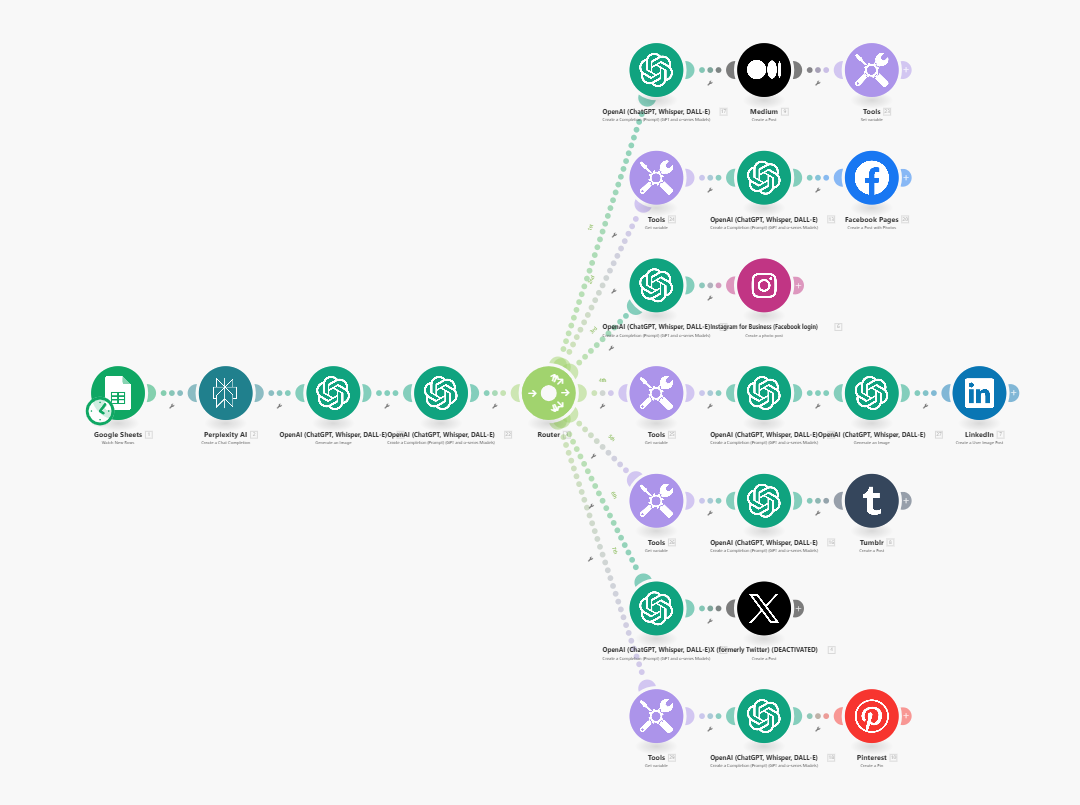
1. Pull a topic. The scenario watches a Google Sheet of curated news links. A new row kicks it off. (An alternative version pulls trending topics automatically through a search API instead of a hand-picked list.)
2. Write the caption. Perplexity reads and summarizes the link, then ChatGPT writes a caption and hashtags. Tone and length are adjusted per platform, which is what the per-branch modules in the diagram are doing.
3. Make the image. DALL·E generates an image from the content. Optional extras: Midjourney through a plugin for a more polished look, a ChatGPT Vision check that the image actually matches the post, or a manual swap from Unsplash or the brand's own folder.
4. Route to each platform. A router sends the content down one branch per platform. LinkedIn gets a longer, more professional caption. Instagram gets the image-first version. Pinterest gets a pin. Any platform the team doesn't use just gets switched off, which is why the X branch is deactivated in the screenshot.
5. Publish or queue. Each branch can post immediately, or push to Buffer for scheduled publishing. I recommended Buffer, and they went with it: better timing, and a queue a human can scan before anything goes live.
Where the Time Actually Went
Images. Image generation is the unreliable part of this whole system. Some of what DALL·E produced was usable straight away. Plenty of it wasn't. The review step exists mostly because of images, and the improvements we talked about afterward (below) are mostly about images too.
Per-platform tuning. Every platform wants something slightly different in caption length, tone, hashtags, and image shape. A single caption pushed everywhere reads wrong on at least two of them. Getting each branch's prompt right took more iterations than building the router did.
Midjourney. The optional Midjourney branch needs a third-party API (which costs money) plus logic to pick from the images it returns. We left it optional.
The Results
- Daily content for every platform now takes the team under 15 minutes a day, spent on review.
- Roughly 5 to 8 hours a week saved on copywriting, image sourcing, and manual posting.
- Engagement went up, because the posting actually happens now, every day, with fresher content.
"This workflow helped so much, social posting was always a 'if I have time' activity, i.e. it never got done, but with this automation, we get consistent, on-brand content ready for review and publishing. We don't love every auto-generated post, but with our input, we can tweak the content to match our style. It's a million times better than what we had before, which was nothing." - Sarah, Small Business Owner
That last line is the honest version of what automation does for social media. The posts aren't all great, and the posting actually happens, which for most small businesses is the whole battle.
What I'd Do Differently Today
Real photos over generated ones. For most small businesses I'd pull from the Unsplash API, or better, from a folder of the business's own photos, before I'd generate images. Image models have improved since this build, but a real photo of your actual shop still beats a generated one for trust, and it never comes out with six fingers.
Add the vision check. Having a model confirm "does this image match this caption" before the post hits the queue was on the list and never got built. It's a two-minute addition now, and it would cut the review time further.
Keep the queue. I'd still route everything through Buffer or a similar queue rather than auto-posting. The 15-minute daily review is the cheapest insurance there is, and it's where the team's voice gets back into the posts.
Wrapping Up
If you want the general version of this pattern: a list of things worth posting about, a model that writes the first pass per platform, images from somewhere you trust, and a queue a human checks. That's it. I built it in Make, and it works the same in n8n or Zapier. The blog-drafting case study I wrote up separately uses the same shape for long-form content.
If social media is a "when I have time" activity for your business, more discipline probably won't fix it. Taking the production work out of the loop might, because the only thing left is 15 minutes of review, and that's a habit most people can keep.
If you want help thinking through what to automate first, book a free 30-minute call and we'll map it out together.
Frequently asked questions
Can you automate social media posts with ChatGPT?
Yes, with a review step. In this build, Make watches a Google Sheet of links, ChatGPT writes a caption and hashtags tailored to each platform, DALL·E generates an image, and the posts are either published directly or queued in Buffer. A person looks at the queue before anything goes out, which is what keeps it on-brand.
Do I need a different caption for each platform?
In practice, yes. LinkedIn, Instagram, X, Facebook, and Pinterest have different lengths, tones, and image preferences. The workflow uses a router with one branch per platform, and each branch asks ChatGPT for a caption written for that platform rather than reusing one caption everywhere.
Are AI-generated images good enough for social media?
Sometimes. Some generated images were usable straight away and some needed replacing, which is why the review step exists. Two improvements worth considering: swap generated images for real photography through the Unsplash API, or add a vision check that confirms the image matches the post before it's queued.
Should posts publish automatically or go to a queue?
Queue them. Routing posts to Buffer instead of publishing immediately gives you control over timing and a chance to catch anything off. The team here reviews the queue in about 15 minutes a day, which is the whole human cost of the system.
How long does it take to build?
About 8 hours for this one. The core flow was quick. The time went into tuning captions per platform and dealing with the fact that generated images aren't reliable enough to trust without a look.