
Automating Proposals, Contracts, and Invoices with PandaDoc and Make: A Case Study
Most service businesses have a version of this problem. The sales call goes well, everyone's excited, and then the person who ran the call sits down to type up a proposal, copy the same details into a contract, and copy them again into an invoice. Same client name, same scope, same price, three times. It takes 20 or 30 minutes if nothing goes wrong, and it usually happens at the end of the day when it's easiest to put off until tomorrow.
For a creative studio I worked with, "tomorrow" was costing them. Proposals that went out a day late got signed a day late, and kickoffs slipped with them. This post is the case study of what we built to fix it. Client name left out, details kept.
The Problem
After every client call, someone at the studio built three documents by hand: a proposal, a contract, and an invoice. The information in all three was nearly identical, so most of the work was copying fields and fixing formatting. It took 20 to 30 minutes per client, and because it was tedious, it got pushed. The delay showed up downstream as slower signatures and postponed project starts.
They wanted the documents generated from the details they already had, with their branding intact, and with a way to make edits when a project didn't fit the mold.
How It Works
The automation runs in Make, with PandaDoc doing the document generation:
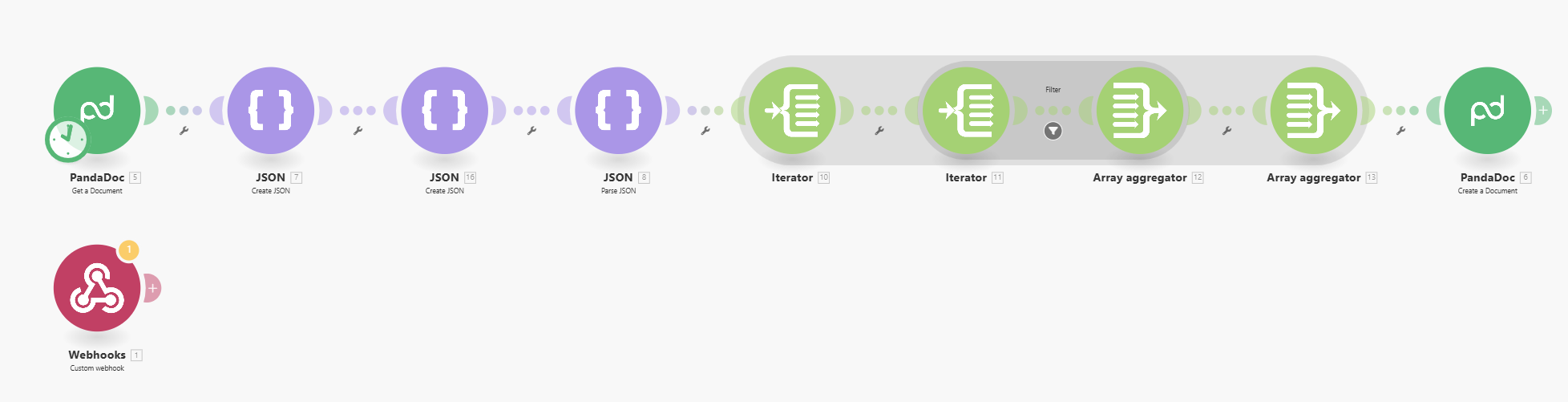
1. Intake. A webhook receives the project details from the studio's lead form: project type, deliverables, client name, scope, and payment terms. The same trigger works from a CRM like HubSpot, Pipedrive, or Close if that's where the deal lives.
2. Reshape the data. This is the unglamorous middle of the diagram. PandaDoc templates expect variables in a specific structure, so the scenario builds that structure, then uses iterators and aggregators to turn the deliverables and milestone payments into the line-item arrays PandaDoc wants. Empty sections and optional packages get filtered out here too.
3. Generate the documents. PandaDoc loads the studio's templates for the proposal, contract, and invoice, and fills in the client name, dates, scope, and pricing. Sections can turn on or off based on the form (a rush fee, a retainer clause), so one template covers most project types.
4. Review or send. The documents land as drafts. The team can edit them in PandaDoc and send for signature, or, for fixed-scope packages, let them go out automatically with an email notification.
5. Log it. The client details and document status get written to a Google Sheet. From there it's easy to add a calendar invite, a welcome email, or a Slack alert.
Form fill to send-ready proposal: under a minute.
Where the Time Actually Went
Three things ate most of the build.
Line items. Every document tool wants its list of deliverables shaped slightly differently, and PandaDoc is particular about it. Getting a variable number of deliverables and milestones into the exact JSON structure it accepts is where the iterators and aggregators in the diagram come from. It's not hard, but it's fiddly, and it's the kind of thing you only get right by testing with real projects.
Conditional logic. A fixed-fee logo project and a six-month retainer don't need the same contract clauses or the same payment schedule. Building fallback rules so the right sections appear for each project type took longer than the templates themselves.
Keeping three documents in sync. The whole point was to type each detail once. That meant making sure the proposal, contract, and invoice all read from the same fields, with no document carrying its own copy of anything.
The Results
- About 30 minutes saved per client on document prep.
- In one week, the team saved over four hours on document busywork alone.
- Proposals went out the same day as the call, while the lead was still warm, which helped close rates and got invoices out sooner.
"Tom helped us automate the slowest part of our onboarding process, generating project documents. Now we go from form fill to send-ready proposals in less than a minute." - Studio Owner
Since launch, the studio added pre-defined packages for fixed-scope work, optional auto-send with email notifications, and a regenerate button for when a form gets edited after the fact.
What I'd Do Differently Today
Start with the packages. The fixed-scope packages were added after launch, and in hindsight they're the easiest win: a package is a known set of deliverables, so there's nothing for the line-item logic to figure out. If I were starting over, I'd build the packaged version first and handle custom projects second.
Hand the JSON wrangling to Claude. The reshaping step that took the most time is exactly the kind of work I now have Claude Cowork do: give it the PandaDoc API docs and a sample submission and let it write the mapping. The scenario would look the same. It would just take an afternoon instead of a day.
Keep the human send. Even with everything automated, I'd still have a person glance at a custom proposal before it goes out. Thirty seconds of review is cheap compared to a wrong number on a signed contract.
Wrapping Up
If your business has a "we do this after every sale" document, this pattern applies: collect the details once, generate everything from the same data, log it, and keep a human on the send button for anything non-standard. The tools matter less than the structure. I built this in Make; it works the same way in n8n or Zapier, and with any document tool that can fill a template.
If you're not sure where to start, what to know before you automate is the checklist I'd run through first. The step I'd map out on paper before touching a tool is the one in the middle of this diagram: what information do you collect, and which documents need it.
If you want help thinking through what to automate first, book a free 30-minute call and we'll map it out together.
Frequently asked questions
Can you automatically generate a proposal from a form submission?
Yes. A form or CRM sends the project details to a webhook, the automation reshapes them into the format your document tool expects, and the document tool fills a branded template. In this build, a submission became a send-ready proposal, contract, and invoice in PandaDoc in under a minute, with the studio still able to edit before sending.
Do I need PandaDoc for this?
No. PandaDoc was the studio's existing tool and it has good template variables and e-signature built in. DocuSign, Google Docs with a template, or any document tool with an API can play the same role. The part that transfers is the pattern: collect the details once, generate every document from the same data.
What's the hardest part of automating proposals and invoices?
Line items. A proposal with three deliverables and two milestone payments has to become a list the document tool understands, and every document tool wants that list shaped slightly differently. Most of the build time here went into that reshaping, not into the templates.
Can the documents still be edited before they go out?
Yes, and I'd keep it that way. The automation creates the documents as drafts in PandaDoc. Someone can tweak scope or pricing and then send for signature, or you can turn on auto-send for fixed-scope packages where nothing changes.
How long does it take to build?
This one took 8 to 10 hours. The templates were quick. The time went into matching the line-item structure, handling optional sections, and making sure all three documents pulled from the same fields so nothing had to be typed twice.