
Automating Lead Response with n8n and GoHighLevel: A Case Study
If someone fills out the contact form on your website, how long does it take before a person calls them back? For most small businesses the honest answer is "it depends." The form lands in an inbox, somebody has to notice it, decide whether it's real, log it in the CRM, figure out whose turn it is, and then actually pick up the phone. None of those steps take long on their own. Together, they can add up to a lead that's already called your competitor.
This post is a case study from a client build. I've kept the parts that are useful if you're thinking about doing something similar and left the client's name out of it.
The Problem
The client runs a business where several reps handle incoming leads, and how fast they follow up has a direct effect on whether the lead converts. Their process was fully manual: a form submission showed up in an inbox, someone checked it for spam, logged it in GoHighLevel, picked a rep, and the rep called back whenever they got to it. Leads were going cold, and some were getting missed altogether.
The obvious fix, a round-robin that assigns every submission to the next rep, wasn't going to work for them. A good chunk of what came through the form was junk: bots, fake phone numbers, disposable emails. They didn't want reps calling those. What they wanted was simple to describe and a little trickier to build: every real lead on the phone with a rep right away, and every fake one kept out of the way.
How It Works
Here's the whole thing in n8n:
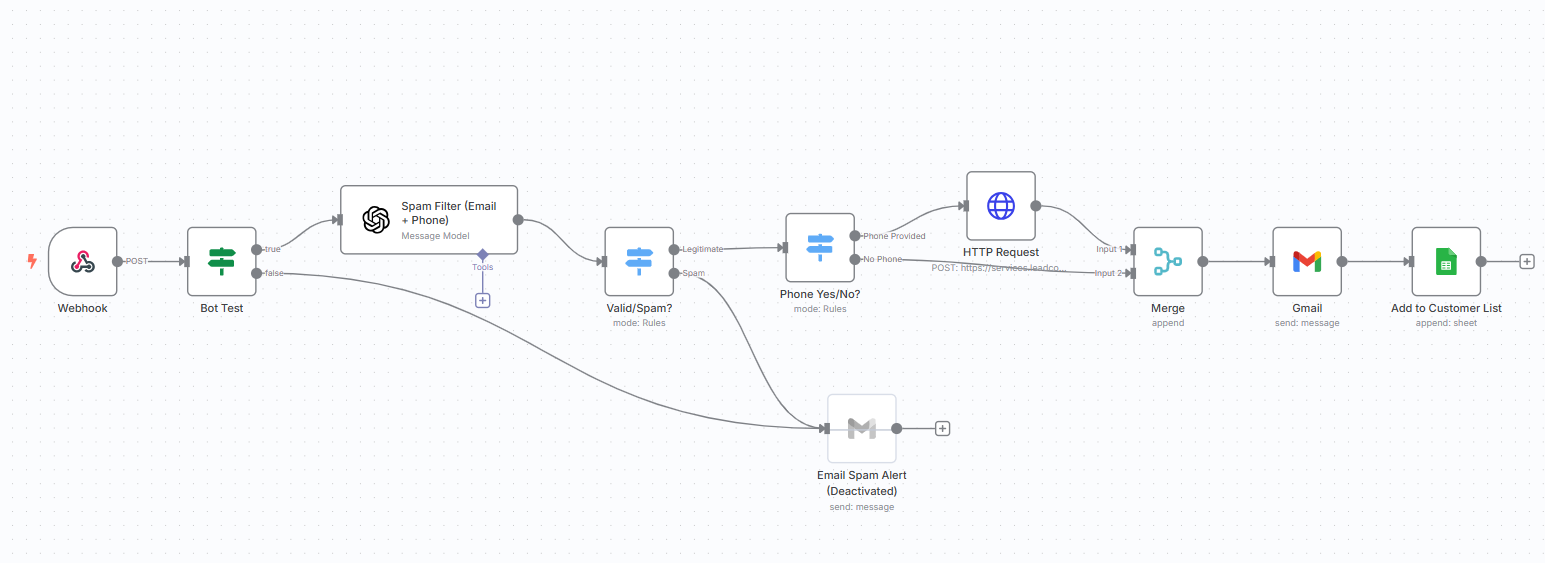
1. The form comes in. A webhook fires the moment someone submits the lead form, carrying their name, email, phone, and message.
2. Two rounds of spam filtering. The first is a lightweight bot test (a honeypot or CAPTCHA check). Anything that fails goes straight to a dead end. Anything that passes gets sent to OpenAI with the email and phone number, and the model decides whether this looks like a real person. This is the part a normal spam filter can't do. It catches a name that doesn't match the email domain, a disposable number, profanity, a message that's gibberish. The model's answer feeds a simple rule: legitimate or spam.
3. Phone or no phone. If the lead is legitimate and left a phone number, n8n makes an HTTP request to GoHighLevel that assigns a rep and triggers an auto-dial, so the rep and the lead are connected on a call. If there's no phone number, it falls back to an email notification and the rep follows up by hand.
4. Notify and log. Either way, the assigned rep gets a templated email with the lead's details, and the lead gets added to a Google Sheet as a backup and for reporting. Every step is logged, so if something goes wrong there's a trail.
That's it. Nobody touches a lead until the phone rings.
Where the Time Actually Went
The main path above took a couple of hours. The rest of the 8 to 10 hours went into three things.
Spotting low-quality leads. Most spam filters only check whether the email address is formatted correctly, which isn't the problem. The problem is the submission that looks fine on the surface and wastes a rep's time anyway. Having a model look at the whole submission, not just the format, is what made the difference.
Timing the phone call. The GoHighLevel request had to fire only after verification finished, and the API didn't always respond on the first try. That meant adding retries and validating the data before sending it, so a half-formed request didn't trigger a call to nobody.
Duplicate notifications. Early on, two reps would occasionally get notified about the same lead. I added a check so each contact gets exactly one assignment. It took a real lead getting called twice to find that one.
The Results
After it went live:
- Valid leads were called within about 60 seconds, automatically.
- Spam and junk entries dropped by roughly 90%.
- Reps stopped triaging the inbox, because only verified, call-ready leads reached them.
- The team estimated 3 to 5 hours saved per week, on top of the leads that no longer went cold.
"We used to lose leads just because we didn't follow up fast enough, or at all. Now the second a form is submitted, our reps are already on the phone." - Sales Ops Manager
What I'd Do Differently Today
A few things have changed since I built this.
The spam check would cost almost nothing now. I used GPT-4 at the time, which was the sensible choice and also the expensive one. A current small model (Claude Haiku, GPT's mini tier) handles "is this a real person" just as well for a tiny fraction of the price. For a form that gets a few hundred submissions a month it's pennies either way, but it adds up at volume.
I'd add a middle bucket. Right now a lead is either legitimate or spam. In practice there's a third category, the submission the model isn't sure about, and today I'd route those to a person for a quick look instead of making the model pick. It's the same rule I use for my own email agent: when unsure, default to review.
I'd still build it this way, not as an agent. It's tempting to replace the rules with an AI agent that reads each lead and decides what to do. For this job I wouldn't. The paths are known, the volume is steady, and the one action that matters (placing a phone call to a customer) isn't something I want a model improvising. Deterministic is the right call here. I'd probably have Claude Cowork build most of the workflow for me now, which wasn't an option when I did this by hand, but the design would be the same.
Wrapping Up
The pattern here is reusable almost anywhere a form feeds a human: filter, route, act, log. The tools are interchangeable. I built this one in n8n, and the same thing works in Make or Zapier. The CRM step depends on what your CRM can do, and the phone step is the one most likely to need a workaround.
If you're newer to this kind of build, automation basics covers the vocabulary, and what to know before you automate is the checklist I'd run through first. A quick test for whether this is worth doing in your business: time how long it takes, today, from someone submitting your form to someone calling them back. If you don't know, that's your answer.
If you want help thinking through what to automate first, book a free 30-minute call and we'll map it out together.
Frequently asked questions
How fast can an automation respond to a web lead?
Fast enough that the lead is probably still on your website. In this build, a valid lead was assigned to a rep and the call was placed within about 60 seconds of the form being submitted. The spam check and the CRM handoff each take a few seconds, and nothing waits on a person.
Do I need GoHighLevel for this?
No. GoHighLevel was the client's CRM, and it happens to handle rep assignment and auto-dial through one API call. The same pattern works with HubSpot, Pipedrive, or any CRM that can accept a webhook. The phone step is the part that varies most, so check what your CRM or phone system can trigger before you plan around it.
How does the spam filter work?
Two checks in a row. A lightweight bot test catches the obvious junk first. Then a language model looks at the name, email, phone, and message together and flags things a rule can't, like a name that doesn't match the email domain, a disposable phone number, or a message that's gibberish. Junk entries dropped by about 90% once both were in place.
Can I build this in Make or Zapier instead of n8n?
Yes. Every piece here (the webhook, the AI step, the branching, the HTTP call, the email, and the spreadsheet row) exists in Make and Zapier too. I used n8n for this client because they wanted to self-host. If you're choosing a platform, my overview of the low-code tools covers the trade-offs.
How long does a lead-response automation take to build?
This one took 8 to 10 hours, including testing. Most of that time went into the spam classifier and into getting the phone handoff to fire reliably after verification, not into the main path. Budget for the edge cases, because that's where the hours go.