
Automating Blog Drafts with n8n, OpenAI, and SerpAPI: A Case Study
If you run a site that lives on search traffic, you know how the week goes. Someone has to figure out what to write about, outline it, write it, format it for the CMS, find a cover image, and log it in the editorial calendar. For the content team I worked with, that was most of a workday per post, and the parts that took the longest weren't the writing. They were everything around the writing.
What they asked for was specific: get from an SEO keyword to a first draft, with metadata, internal links, and a cover image, without touching Google Docs or copying and pasting between systems. The draft didn't need to publish itself, just show up in the editor's inbox ready for a human pass. This is the case study of that build.
The Problem
The client runs a high-volume content site driven by SEO. Their team was spending hours every week researching trending topics, drafting outlines, writing full articles, converting them to HTML, sourcing images, and maintaining the calendar. The output was fine. The overhead was eating the week.
They were clear about one thing from the start, and I agreed with them: this was a drafting system, not a publishing system. A person reviews every post before it goes live.
How It Works
The whole workflow runs in n8n on a schedule:
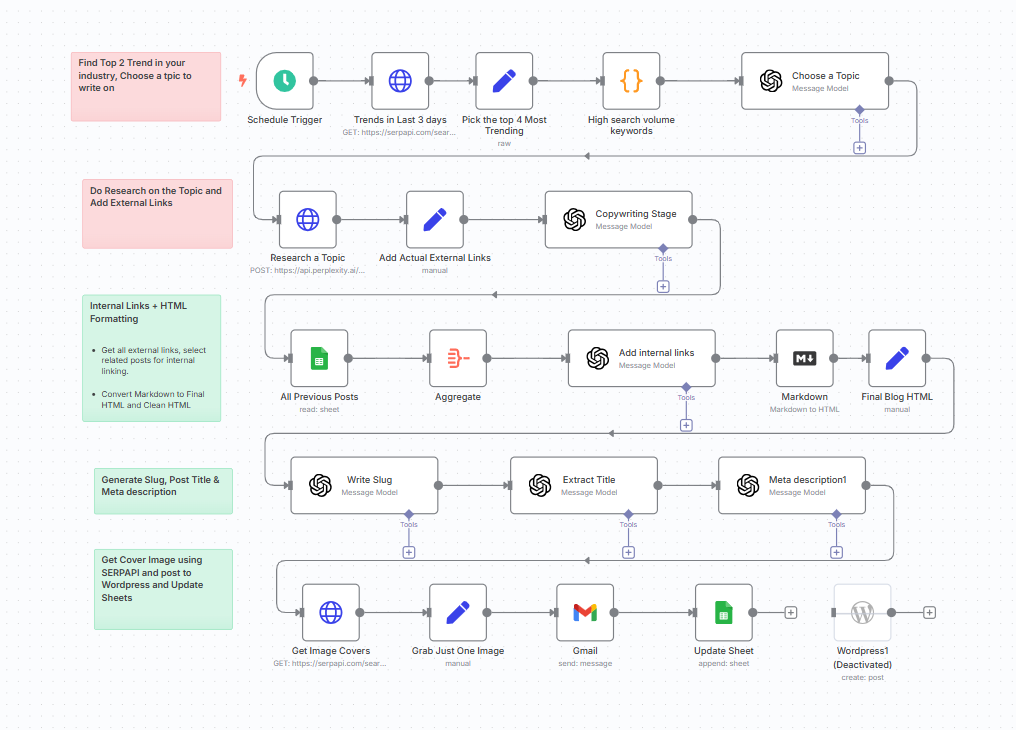
1. Find a topic. Every few days, a scheduled trigger asks SerpAPI for the top search trends in the client's industry from the last three days. A GPT node looks at the top few and picks the one worth writing about, based on volume and relevance.
2. Research and write. A Perplexity call gathers quick research and source links on the topic. Then a copywriting GPT node writes the full post, 800 to 1,200 words, with structure and Markdown formatting. External links get added here, with the editor free to swap them later.
3. Internal links and HTML. The workflow reads every existing post from a Google Sheet, hands the list to a GPT node along with the new draft, and asks it to pick related articles and place the links. Then the Markdown converts to clean HTML for WordPress.
4. Metadata. Three small GPT nodes write the slug, the post title, and the meta description. Each is saved separately so the editor can tweak any of them.
5. Cover image. SerpAPI pulls candidate images for the topic, the workflow selects one, and it gets embedded with the post.
6. Deliver and log. The post, image, and metadata go to the editor by email. The slug, title, and date get appended to a Google Sheet that doubles as the archive. There's a WordPress node at the end of the diagram that can create the post directly. I left it switched off.
Where the Time Actually Went
Writing the first draft took an afternoon. The rest of the 15 to 20 hours went here.
Duplicate topics. Left alone, the trend picker would happily choose a topic the site had covered two months earlier. I added a check against the archive sheet so a topic that's already been written gets skipped.
Tone. The early drafts were generic. Readable, correct, and forgettable. Most of the prompt work was about getting the model to write in the site's register rather than in default AI voice, and that took more rounds than anything else in the build.
HTML cleanup. Markdown-to-HTML conversion is never quite clean. Stray tags, inconsistent heading levels, and formatting that looked fine in Markdown and wrong in WordPress all needed sanitizing rules.
Image selection. SerpAPI sometimes returned images that were off-brand or just odd. Fallback filters fixed most of it, and the editor replaces the rest.
The Results
- Draft creation time dropped by about 80%.
- Editors received fully formatted posts with internal links and SEO metadata, instead of a blank page.
- Posts were more consistently structured and easier to publish.
- The content calendar stayed full without the writing grind.
- Estimated time saved: 6 to 8 hours per week.
"It used to take a full workday to go from topic research to draft. Now I get a formatted blog post with links, metadata, and a cover image sitting in my inbox, ready to go. It's a dream setup." - Rae, Editor
Since launch, the workflow also writes alt text for the cover image. A tone selector (technical, casual, storytelling) and Slack alerts when a draft is ready have been discussed but not built.
What I'd Do Differently Today
Fewer nodes. This workflow has six separate GPT calls because that's how you had to build it at the time. The AI agent nodes in n8n and Make can now handle "research this, write it, link it, and produce the metadata" as one step with tools. I'd still keep the archive check and the HTML cleanup as explicit steps, because those are the ones I want to be predictable.
Spend the tone budget up front. The prompt refinement that took the longest is now the first thing I'd do: collect five posts the editor loves, five they don't, and build the writing prompt from those before touching the rest of the workflow.
Still no auto-publish. If anything, I'd be firmer about this than I was then. Search engines have gotten better at spotting thin, unreviewed AI content (I think), and more importantly the editor's pass is what keeps the site sounding like itself. The workflow's job is to remove the busywork around writing, not the judgment.
Wrapping Up
The pattern here is a drafting assistant, not a content machine: a trigger finds the work, a model does the first pass, the system handles formatting and metadata, and a person makes the call. That same shape works for newsletters, product descriptions, and social posts. I covered the social version in a separate case study, and if you want the broader landscape of what these tools can do, the low-code overview is the place to start.
If you're thinking about something like this for your own site, the question to answer first is which parts of your content process are busywork and which parts are the reason people read you. The busywork is what this kind of workflow is for. The other part is worth keeping in human hands, even when the model is good.
If you want help thinking through what to automate first, book a free 30-minute call and we'll map it out together.
Frequently asked questions
Can AI write a blog post automatically?
It can write a draft automatically. In this build, n8n picks a trending topic, has OpenAI research and write the post, adds internal links and metadata, pulls a cover image, and emails the package to an editor. What it doesn't do is publish. Every draft gets a human pass first, and that's the part I'd never automate away.
How do you pick topics for an automated blog?
The workflow queries SerpAPI for search trends in the client's industry from the last three days, then asks a language model to choose the most promising one based on volume and relevance. It also checks the archive first, so it doesn't write a second post on a topic the site already covers.
How do you add internal links automatically?
The workflow reads a list of every published post from a Google Sheet, hands that list and the new draft to a language model, and asks it to pick the related posts and place the links. That's the single step that made the biggest difference to how finished the drafts felt.
Does this work with WordPress?
Yes. The drafts are converted from Markdown to clean HTML so they can be pasted straight into WordPress, and the workflow can create the post through the WordPress API if you want it to. For this client I left that node turned off and delivered drafts by email instead.
How long does a blog automation take to build?
This one took 15 to 20 hours. Writing the first draft was the easy part. The hours went into prompt refinement so the drafts sounded right, cleaning up the HTML, filtering out off-brand cover images, and the archive check that prevents duplicate topics.