AI Privacy & Security: What Every Business Needs to Know
Your employees are almost certainly using AI tools at work. Depending on which survey you read, somewhere between half and two-thirds of them are doing it without IT approval, oversight, or any understanding of what happens to the data they type, paste, or upload. For small businesses, this isn't a theoretical risk. It's happening right now.
This guide is a practical walkthrough of how the major AI tools handle your data, what can go wrong, and what you can actually do about it, whether you're a business owner, a team lead, or the person everyone asks "is this safe to use?"
Want the short version? Download the three-page AI Privacy Overview. It covers what happens to your data, how to turn training off in each tool, and how consumer and business accounts compare, written for non-technical teams. Feel free to share it.
What Happens When You Hit "Send"
Every message you type into an AI tool passes through a multi-stage pipeline. Understanding each step is the foundation for making informed decisions about what you share.
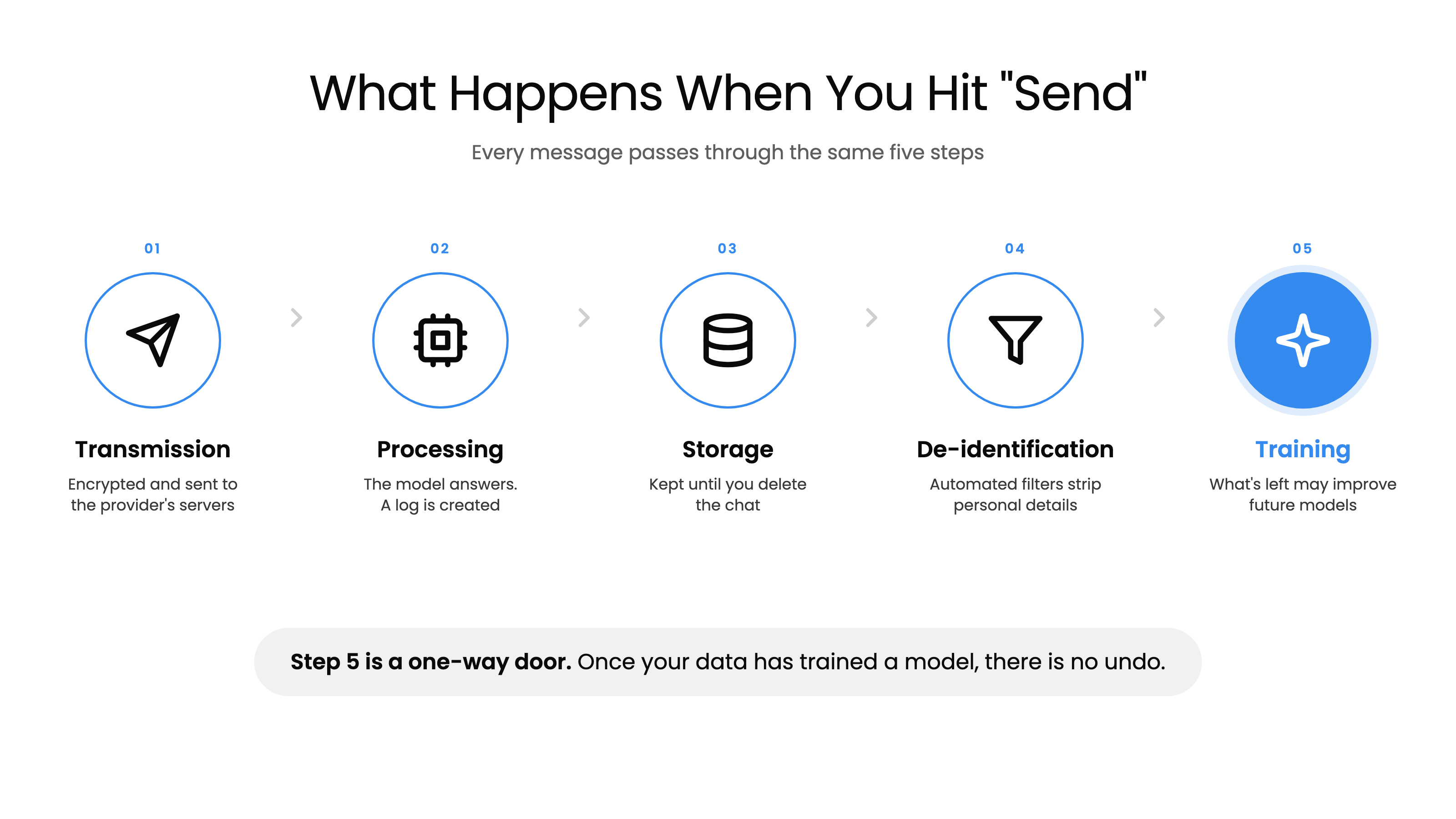
- Transmission: Your message is encrypted and sent to the provider's servers.
- Processing: The model generates a response and a log of the exchange is created.
- Storage: That log is kept. On most tools it stays until you delete the chat; Gemini auto-deletes after 18 months by default.
- De-identification: Automated filters attempt to strip personal data.
- Training: What's left may be used to improve future models.
The critical insight here is that step 5 is a one-way door. Once your data trains a model, there is no "undo." You cannot extract it back out, not through a deletion request, not through account closure, not through anything. It is permanent.
The Most Important Distinction You're Probably Missing
Most people collapse three very different concepts into one word, "privacy." But storage, human review, and training are fundamentally different, and understanding the difference changes how you think about AI tools.
Storage means the company keeps a copy of your conversation on their servers. This happens on every platform and every tier, even with privacy settings enabled. On consumer accounts, saved chats stay until you delete them (ChatGPT and Claude then purge them within 30 days), and Gemini auto-deletes after 18 months by default. You can shorten that on some tools and delete individual chats, but you can't switch storage off.
Human review means a real person at the company could read your conversation. Not at random, and not routinely. It happens in specific situations: you click thumbs up or thumbs down on a response, you contact support and they troubleshoot, you leave training on and your chat is sampled, safety systems flag it as a possible policy violation, or a court or regulator compels it. Google keeps human-reviewed chats for up to 3 years, even after you delete the conversation from your account.
Training means your conversation becomes data that makes the next model smarter. Claude, ChatGPT, and Gemini all have training on by default for every consumer tier. Business tiers (Team, Business, and Enterprise) never train on your data, by contract.
Here's the part that trips people up: turning off training does NOT mean your data isn't stored. It does NOT mean no human will ever read it. These are three separate controls.
A Toggle Is Not a Contract
On a personal account, training is a setting. When you flip that switch, you're trusting a setting, not a legal document. The company can change the default in a future policy update, and you have no legal remedy if it does. This has already happened: in 2025, Anthropic revised its consumer terms and asked every existing Claude user to make the training choice again.
Business accounts are different. On Team, Business, and Enterprise plans, "no training on your data" is a contractual commitment, backed by a Data Processing Addendum (DPA) that spells out exactly how your data is handled, stored, and protected. It cannot be changed without both parties agreeing.
You're not just paying for better features when you upgrade to a business plan. You're paying for legal protection over your data.
Two Things That Override Every Setting You Choose
The law. All three major providers state plainly that they will retain data and hand it over when legally compelled: a subpoena, a warrant, a court order, a regulatory demand. A court can also order data preserved past the deletion date the provider advertises. That happened to OpenAI in 2025, when a court ordered it to preserve consumer ChatGPT conversations during a lawsuit. The order was lifted in October 2025, but OpenAI still holds months of chats it would otherwise have deleted. Your retention setting is a company policy, not a legal shield.
The feedback button. Clicking thumbs up or thumbs down sends the entire conversation, not just the message you rated. On personal ChatGPT and Gemini accounts, feedback is an explicit exception to your training opt-out (ChatGPT Business and Enterprise don't train on rated chats, and admins can turn rating off under Workspace settings, then "Allow response feedback"). On Claude, rating a chat counts as permission to use it for training, and the rated conversation is kept for up to five years regardless of your training setting. That applies even on Team and Enterprise accounts. (Team and Enterprise owners can turn rating off under Organization settings, then Data and Privacy, then "Rate chats." It's on by default.)
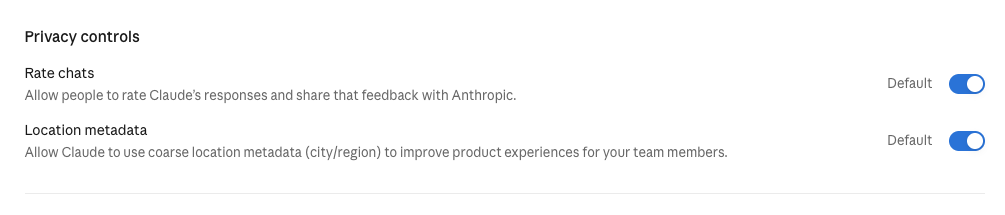
If a conversation is sensitive, don't rate it.
The "How is Claude doing this session?" pop-up in Claude Code works differently. Answering it records only your rating, not the conversation. Sometimes a second question follows, asking whether Anthropic can look at your session transcript. Saying yes uploads the full session (kept for up to six months and not used for training), and saying no sends nothing. If you'd rather not see the survey at all, set CLAUDE_CODE_DISABLE_FEEDBACK_SURVEY=1. The /feedback command is the exception: like the thumbs buttons in regular Claude chats, it sends your conversation, including code, and Anthropic can keep it for up to five years.
The Big Four: How They Actually Compare
ChatGPT, Gemini, Claude, and Perplexity dominate business AI usage. Here's how the three most common ones compare on consumer and business accounts:
| Claude | ChatGPT | Gemini | |
|---|---|---|---|
| Training, consumer tiers | On by default, all tiers | On by default, all tiers | On by default, all tiers |
| Consumer retention | Until you delete it, then purged within 30 days; 5 years if training is on | Until you delete it, then purged within 30 days | Auto-deleted after 18 months by default |
| Human review possible | Yes: flagged content and feedback | Yes: abuse, support, legal, feedback | Yes: sampled chats kept 3 years |
| Training, business tiers | Never, by contract | Never, by contract | Never, by contract |
| Data Processing Addendum | Team and Enterprise | Business and Enterprise | Workspace Business and up |
| HIPAA agreement (BAA) | Enterprise only | Specific products only (see below) | Any Workspace plan, once the admin accepts Google's BAA |
ChatGPT (OpenAI) is the most widely used. Training is on by default for Free, Go, Plus, and Pro, so paying more for a personal plan doesn't turn it off for you. Business and Enterprise plans never train on your data and come with a DPA. A HIPAA agreement (BAA) is only available on specific products: ChatGPT Enterprise with Regulated Workspace, ChatGPT for Healthcare, and the API with modified retention. A plain Enterprise plan doesn't include one.
Gemini (Google) has the longest default retention of the three at 18 months. Human-reviewed chats are kept for up to 3 years in a separate system, even after you delete the conversation from your account. History and training are one switch: turning off Keep Activity stops training, but it also stops saving your chats. Workspace Business plans and up never train on your data, and any Workspace admin can accept Google's HIPAA agreement for Gemini. On personal accounts, Google's opt-in "Personal Intelligence" feature can connect Gemini to Gmail, Photos, and Calendar (it isn't available on Workspace accounts, or in the EU and UK).
Claude (Anthropic) used to be the exception here, and it isn't anymore. Since fall 2025, Claude's consumer plans (Free, Pro, and Max) ask whether you want to help improve Anthropic's AI models, with the option pre-selected, so clicking through turns training on. Leaving it on also extends retention from 30 days to five years. Team and Enterprise never train on your data, by contract. On the API, inputs and outputs are deleted within 30 days, and Zero Data Retention (ZDR) covers the API and Claude Code, not the web interface. One caveat: Anthropic's newest models require 30-day retention even under ZDR unless Anthropic expressly authorizes otherwise. Anthropic also holds ISO 42001 certification, a newer standard for managing AI systems responsibly.
Perplexity routes queries through multiple third-party models (OpenAI, Anthropic), but maintains contractual zero-training agreements with those providers. Perplexity itself does train on your data by default on Free, Pro, and Max, though; the switch is called "AI Data Retention" under Account Settings → Preferences. Consumer conversations are stored indefinitely until manually deleted, the longest consumer retention of the four. Perplexity also shares more data with advertisers and business partners than the other three, and faces a class-action lawsuit alleging embedded tracking code.
If You're Choosing a Claude Plan
Team is the smallest plan that gives you a real contract. Enterprise is what you need if you're regulated, or if you have to prove what happened.
| Team | Enterprise | |
|---|---|---|
| Training on your data | Never, contractual | Never, contractual |
| Data Processing Addendum | Included | Included |
| Single sign-on | Included | Included |
| Conversation retention | Indefinite, not configurable | You set it, 30-day minimum |
| Audit logs and compliance export | No | Yes |
| SCIM user provisioning | No | Yes |
| HIPAA agreement (BAA) | No | Yes, once activated |
Team conversations are kept indefinitely by default. That's retention, not training. Nothing is trained on either way.
If You're Choosing a ChatGPT Plan
Business is the plan OpenAI used to call Team (renamed in August 2025). It's self-serve, for 2 to 200 people, and it gets you the contract. Enterprise is custom-priced and gets you control over retention and a paper trail.
| Business | Enterprise | |
|---|---|---|
| Training on your data | Never, unless you sign a separate agreement | Never, unless you sign a separate agreement |
| Data Processing Addendum | Included (you sign OpenAI's DPA form) | Included, plus custom legal terms |
| Single sign-on | Included (SAML and OIDC) | Included |
| Conversation retention | Indefinite until someone deletes it | You set it: 90 days, 180 days, or indefinite |
| Audit logs and compliance export | No | Yes, through the Compliance API |
| SCIM user provisioning | No | Yes |
| HIPAA agreement (BAA) | No | Only with the Regulated Workspace configuration (or ChatGPT for Healthcare) |
On both tiers, thumbs up or thumbs down does not opt a conversation into training, and admins can switch feedback off under Workspace settings, then "Allow response feedback." Zero Data Retention is an API-only, contracted option; neither chat plan offers it.
What Deleting a Chat Actually Does
Less than most people assume, and it varies by tool:
- Claude: the chat disappears from your history right away and is purged from Anthropic's servers within 30 days. A deleted chat won't be used for future training, but anything already included in a training run stays there. Rated chats are the exception: they're kept for up to five years.
- ChatGPT: deleted chats are removed from OpenAI's systems within 30 days, unless a legal hold applies. Temporary chats are kept for up to 30 days for safety checks either way.
- Gemini: deleting your activity removes it from your account, but any chat a human reviewer has already looked at is kept in a separate system for up to three years. Even with Keep Activity off, new chats are held for 72 hours.
Deletion stops future use. It doesn't reach back into a model that has already trained on the conversation.
Don't Forget About Files and Voice
Uploaded files follow the same privacy and training policies as text chat. If training is on, your files are included. But there's a catch that most people miss: no provider strips file metadata by default.
Photos carry EXIF data with GPS coordinates and timestamps. Word documents include author names and tracked changes. PDFs embed creation dates and comments. Before uploading anything sensitive, use "Inspect Document" in Word or strip metadata from images using a tool like ExifTool.
For voice mode, policies vary. OpenAI keeps audio under a separate "Include your audio recordings" toggle, so turning on text training doesn't automatically share your voice. Google doesn't use your audio or Gemini Live video to improve its models unless you opt in separately. Either way, recordings generally follow the same retention as the chat they belong to, so treat voice like text.
Before You Point an Agent at Your Files
More AI tools can now work directly with the files on your computer, your email, and your other apps. Two things are worth knowing before you turn that on.
Local files are not local. When an AI agent works on files on your computer, the contents are sent to the provider's servers to be processed. Coding tools send only the files they need as context, but that still leaves your machine. "It's on my laptop" is not a privacy control. Your account tier decides what happens next, same as chat.
Prompt injection. This only becomes a risk once an agent can read your email, documents, or the web. Hidden instructions buried in a document or web page can hijack the agent and make it leak data. Prompt injection sits at the top of OWASP's list of risks for AI applications. The best defense is simple: grant the narrowest access that does the job.
Shadow AI: The Risk You Can't See
"Shadow AI" is the term for employees using unapproved AI tools at work, and it's far more widespread than most business owners realize. Industry data shows a significant increase in shadow AI usage from 2023 to 2025, with most enterprises having zero visibility into what tools employees are actually using.
Employees paste customer data, source code, financial projections, and legal documents into free-tier AI tools daily. The cost isn't limited to potential breach costs. It includes direct costs and hidden productivity losses.
Blocking tools isn't the answer either. If employees don't have good approved options, they'll find unapproved ones. The solution requires providing approved tools, implementing data loss prevention controls, creating clear policies, and genuine training.
When It Goes Wrong: Real-World Incidents
These aren't hypothetical scenarios. They've already happened.
In March 2023, Samsung engineers pasted proprietary semiconductor source code and internal meeting notes into ChatGPT for debugging help. That data went to OpenAI's servers, where, under ChatGPT's consumer terms at the time, it could be used for training. Samsung restricted employee use of generative AI tools soon after, but the data had already left the building.
In 2024, a vulnerability in the Flowise AI platform (CVE-2024-31621) exposed 438 servers, leaking GitHub tokens, OpenAI API keys, and model configurations, all in plaintext.
In August 2025, a threat actor used stolen OAuth tokens from an AI-powered customer service integration to access over 700 organizations' Salesforce environments.
Throughout 2025 and 2026, AI app breaches exposed millions of intimate messages, government ID documents, patient records, and children's conversations across various platforms. One tally counts more than 20 documented AI app data breaches between January 2025 and February 2026.
The Regulatory Clock Is Ticking
If the security risks aren't enough motivation, the regulatory landscape keeps tightening.
Over 20 US states now have comprehensive privacy laws. HIPAA requires Business Associate Agreements (BAAs) for any AI processing health data. FINRA has reminded financial firms that their existing supervision rules apply to generative AI too.
In the EU, the AI Act's first wave of obligations, like telling people when they're interacting with an AI and labeling AI-generated content, has applied since August 2, 2026. In July 2026, the EU pushed back the heaviest requirements for high-risk systems, to December 2027 for most and August 2028 for AI built into regulated products. Penalties for the most serious violations reach 7% of global annual turnover, and the Act applies to any organization whose AI is used in or affects the EU, regardless of where it's based. Deadlines like these keep moving, which is why I built RegBrief.ai to track them.
There's also the US CLOUD Act, which means US law enforcement can compel any US-headquartered company to provide data stored anywhere in the world. All four major AI providers are US-based. Data residency does not equal data sovereignty.
If you don't have an AI governance policy in place yet, my simple AI governance framework is a good place to start.
What You Can Do Right Now
Individual Users: Do Today
- Turn off training in every AI tool you use, for every person on your team:
- Claude: Settings → Privacy → "Help Improve our AI models" → off
- ChatGPT: Settings → Data controls → "Improve the model for everyone" → off
- Gemini: Settings → Keep Activity → off, or set auto-delete to 3 months
- Perplexity: Account Settings → Preferences → "AI Data Retention" → off
- Don't rate sensitive conversations with thumbs up or thumbs down
- Use temporary or incognito chat modes for sensitive queries
- Never paste passwords, API keys, credentials, or financial account numbers
- Strip metadata from files before uploading
- Treat AI like a public conversation: don't type anything you wouldn't say on a conference call with strangers
This Week
- Review which AI tools you've signed up for and what data they hold
- Delete old conversations you no longer need
- Switch to your organization's approved business AI accounts instead of personal free accounts
- Review privacy settings after every major product update, since providers change defaults frequently
For IT & Security Teams
- Provide approved tools. Deploy business tiers (Team, Business, or Enterprise) with contractual protections: no training on your data and a signed DPA. If you're regulated or need audit logs, look at Enterprise.
- Implement technical controls. Deploy DLP at the prompt level (tools like Nightfall AI, Microsoft Purview, or Cloudflare AI Gateway), use a CASB to detect unauthorized AI tool access, and consider turning off chat rating in your admin settings if your team handles sensitive data.
- Create and enforce policy. Publish an AI Acceptable Use Policy, include a data classification framework, and mandate real training with verification.
- Monitor and audit. Detect shadow AI usage, audit approved tool usage patterns, and review provider privacy policies quarterly.
A Simple Framework: What Data Can Go Where?
Not all data is equal. If your organization does nothing else, implement this classification framework.
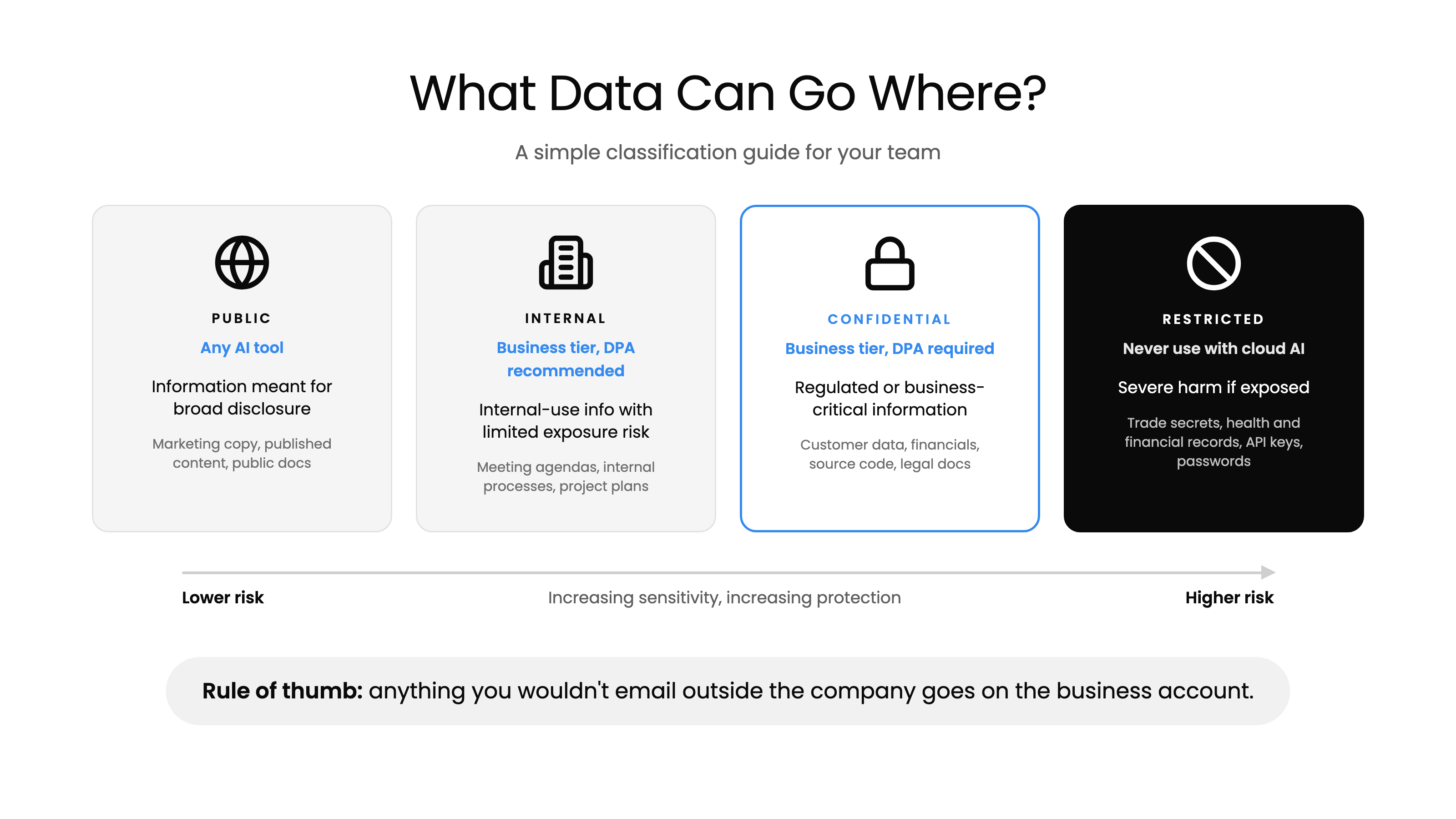
Public (any AI tier): Information intended for broad disclosure: published content, marketing materials, public documentation. Example: "Summarize this blog post" or "Help me write a social media caption."
Internal (business tier with a DPA recommended): Internal-use information with limited exposure risk: internal processes, general business discussions, non-sensitive project planning. Example: "Help me structure this team meeting agenda."
Confidential (business tier with a DPA required): Restricted access information with regulatory or business impact if exposed: customer data, financial projections, source code, legal documents, HR records.
Restricted (never use with cloud AI): Highest sensitivity: trade secrets, regulated health or financial data without a BAA in place, classified information, credentials and API keys. Use on-premises solutions or don't use AI at all.
If you only remember one rule: anything you wouldn't email outside the company goes on the business account. Personal accounts are for public and low-stakes work. And passwords, API keys, and account numbers go into no tier, ever.
The 7-Question Privacy Test for Any AI Tool
When evaluating any AI tool, not just the big four, walk through these seven questions:
- Does this tool train on my data by default? Best: opt-in (training OFF by default). Red flag: no opt-out or vague language.
- Where is my data stored, and for how long? Best: short retention (7-30 days) with geographic region specified. Red flag: "indefinite" or unspecified retention.
- Can humans at the company read my conversations? Best: only for flagged content with documented access controls. Red flag: broad human review with no specifics.
- Is there a Data Processing Addendum (DPA) available? If there's no DPA, the tool is not ready for organizational data, full stop.
- What compliance certifications does this tool hold? Baseline: SOC 2 Type II. Better: ISO 27001. Healthcare: BAA required.
- What happens to my files and metadata? Best: files processed in memory, metadata stripped, not retained. Red flag: no file-specific privacy policy.
- What happens to my data if the company is acquired or goes bankrupt? Best: explicit data deletion clause. Red flag: silence on this topic, since data may become a transferable asset.
Frequently Asked Questions
Is it safe to use free AI tools for work? It depends on what you're putting in. For truly public information, like drafting marketing copy, brainstorming ideas, or summarizing published articles, free tiers are generally fine. But for anything involving customer data, financial information, internal processes, or proprietary knowledge, free tiers are risky. Claude, ChatGPT, and Gemini all train on consumer conversations by default, and you have zero contractual protection.
We're a small team. Do we really need enterprise tiers? If you're handling any customer data, financial information, health records, or proprietary business information, you need a business tier, but not necessarily Enterprise. Team plans are the smallest plans that give you a real contract: no training on your data and a DPA. Start there, and move to Enterprise if you're regulated, need a HIPAA agreement, or need audit logs.
Can I just tell my team not to use AI? You can try, but history suggests it won't work. Employees will use AI tools regardless. They'll just do it without your knowledge (shadow AI). A better approach is to provide approved tools with clear guidelines about what data can and can't go in. Give your team good options and they're far less likely to reach for unapproved ones.
What if we've already put sensitive data into a free AI tool? Turn off training immediately in your settings, delete the conversations, and switch to a business tier going forward. Unfortunately, if training was enabled when the data was submitted, there's no way to extract it from the model. The best you can do is prevent further exposure and assess what was shared to determine if notification obligations apply.
How often do AI providers change their privacy policies? Frequently. Major providers update their terms several times per year, and these updates can change defaults, retention periods, and training practices. Claude's switch to training on by default for consumer accounts is a recent example. Make it a habit to review privacy settings quarterly, and consider subscribing to provider privacy update notifications. This is one reason why contractual protections matter: a contract can't change without your agreement, but a privacy policy can.
Do AI tools comply with HIPAA? Not automatically. The major providers offer HIPAA-compliant options, but only on their top business tiers with a signed Business Associate Agreement (BAA). Using any AI tool with patient health information without a BAA in place is a HIPAA violation, regardless of how the provider markets their security features.
What about AI tools that connect to our email, calendar, or files? Every integration expands the data flowing through the AI provider. Google's "Personal Intelligence" feature, for example, can connect Gemini to Gmail, Photos, and Calendar. Before enabling any integration, ask: does this tool actually need access to this data? Each new connection increases your attack surface, and agents that can read outside content also open the door to prompt injection.
Is anonymization enough to protect our data? No. While the major providers claim to de-identify data before training, no provider publishes their specific methods or accuracy rates. Google, for example, says it uses automated tools to remove identifying information, which is a best effort rather than a guarantee. Academic research has demonstrated extraction of personal information from supposedly anonymized training data. Anonymization reduces risk, but it doesn't eliminate it.
Final Thoughts
AI is powerful, and it's not going away. The goal isn't to avoid it. It's to use it with your eyes open.
The good news is that the steps to protect your business aren't complicated. Turn off training on consumer tools, and don't rate sensitive chats. Use a business tier for anything sensitive. Create a simple data classification policy so your team knows what goes where. And treat AI the same way you'd treat any other vendor that handles your data: with clear agreements, ongoing oversight, and a healthy respect for what's at stake. Providers change these defaults often, so it's worth re-checking your settings after major product updates.
If you're not sure where to start, or you want help evaluating tools and building an AI governance framework for your team, book a free 30-minute consultation and we'll figure it out together.